I built stt.503mail.com: hold a button on my phone, talk, and about a second and a half later the words are typed into whatever window has focus on the computer I picked. That can be a terminal, a browser or anything else. Speech recognition runs on my own Proxmox mini PC's built-in graphics, so no audio leaves the house. Other features:
- Spoken symbols ("dollar sign", "open curly") so it can type code and shell commands.
- Tab and Enter buttons on the phone.
- A one-tap download link to add another Windows or Linux computer.
- A bold orange console window where you copy text just by dragging the mouse.
- You can also just type in that window: Enter sends the line to the window you were in before (added 05OCT2026).
- Everything spoken or typed goes into a daily log on the PC, with a search panel in the bottom third of the agent window (today, 7 days, 30 days or all).
- A phone page built to work with TalkBack and Select to Speak.
- The server also archives every transcript, one text file per day, and copies it to the PC's 3 TB D: drive every 5 minutes (added 06OCT2026).
This post is the complete rebuild guide: every file and every command, with a Copy button on each.
How it works
- The phone page (an installable web app) records while you hold the button, or between two taps, and uploads the clip, usually WebM/Opus from Chrome.
- ffmpeg converts it to 16 kHz mono WAV in under 0.1 s.
- whisper.cpp with the large-v3-turbo model (q5_0, about 550 MB) transcribes it on the mini PC's Radeon 680M through Vulkan. A 19-second clip took 1.3 s, and an 11-second clip about 1.1 s. The same 11-second clip takes about 11 s on the CPU alone.
- A small Flask relay sends the text over a WebSocket to the agent on the chosen computer. "Auto" picks the computer whose keyboard or mouse was touched most recently.
- The agent is one portable Go binary (
stt-agent.exeon Windows,stt-agenton Linux) that runs in a terminal window. It types the text into the focused window and also prints it, so you can mouse-select and copy it. Then it confirms back, and the phone shows "Typed on desktop-pc".
Security: the phone side has one password (5 wrong tries locks that address out for 15 minutes). Each computer has its own secret token, and only a SHA-256 of it is stored on the server. The text never contains newlines or control characters; Enter is only pressed when the phone's Press Enter after switch is on. That matters, because this thing can type into terminals. Audio is never stored. The text is kept in two places: the agent's own daily log on each computer (see "The agent's log and search panel"), and the server's archive, one file per day, copied to the PC (step 16). The server's service log only records lengths and timings.
Containers involved
| Container | Role | LAN IP |
|---|---|---|
| CT 301 (stt-server) | whisper.cpp server (local port 8080) + Flask relay (port 8000) | x.x.0.232 (DHCP, reserved on the router) |
| CT 108 (Caddy reverse proxy) | HTTPS for stt.503mail.com, forwards everything (including the WebSocket) to CT 301 (stt-server) | x.x.0.122 |
| CT 201 (Uptime Kuma) | Monitors the site (status.503mail.com) | |
| CT 202 (creator-signup) | Only used to run the Kuma script, since it already has the Kuma API library and login | x.x.0.198 |
The host is a Ryzen 7 7735HS mini PC (16 threads, 62 GB RAM) with no graphics card. Its built-in Radeon 680M is shared into containers as /dev/dri. CT 300 (ocr-reader) uses the same GPU at the same time, which works fine; a dictation during a mail summary is just a bit slower. CT 301 (stt-server) gets 8 cores, 8 GB RAM and a 16 GB disk.
No DNS change was needed, because 503mail.com already has a wildcard A record.
Where to run each command
- Proxmox host shell: in the Proxmox web UI click pve → Shell (or SSH to the host as root). Almost everything below runs here. The
pct exec 301 -- ...commands reach into the container from the host. - Inside CT 301 (stt-server): Proxmox web UI → 301 (stt-server) → Console, or
pct enter 301from the host shell. Needed for the password and the computer tokens, because those prompt or print secrets. - Your PC: a PowerShell window on Windows, or a terminal on Linux, for the agent.
Rebuild, step by step
1. Make a working folder on the host
Proxmox host shell:
mkdir -p /root/stt && cd /root/stt2. Create every file
Paste each block into the Proxmox host shell. Each one writes one file into /root/stt/.
01-create-stt-lxc.sh creates the container on Debian 13 (newer Mesa and Vulkan headers than Debian 12, which whisper.cpp's Vulkan build wants) with the GPU passed in:
cat > /root/stt/01-create-stt-lxc.sh <<'EOF'
#!/bin/bash
# ============================================================
# 01-create-stt-lxc.sh
# Run this ON YOUR PROXMOX HOST.
# Creates CT 301 (stt-server) for phone dictation (stt.503mail.com):
# whisper.cpp on the Radeon 680M via Vulkan + a small Flask relay.
# The GPU is shared with CT 300 (ocr-reader) - render nodes can be
# mapped into several containers at once.
# Debian 13: newer Mesa (RADV) + Vulkan headers than Debian 12,
# which whisper.cpp's Vulkan backend wants.
# ============================================================
set -euo pipefail

CTID=301
HOSTNAME="stt-server"
STORAGE="local-lvm"
TEMPLATE="local:vztmpl/debian-13-standard_13.1-2_amd64.tar.zst"
DISK_SIZE="16"
MEMORY="8192"
SWAP="1024"
CORES="8"
BRIDGE="vmbr0"
IP_CIDR="dhcp"

if pct status "$CTID" >/dev/null 2>&1; then
    echo "CT $CTID already exists - refusing to overwrite." >&2
    exit 1
fi

echo "==> Creating LXC $CTID ($HOSTNAME)..."
pct create "$CTID" "$TEMPLATE" \
    --hostname "$HOSTNAME" \
    --storage "$STORAGE" \
    --rootfs "${STORAGE}:${DISK_SIZE}" \
    --memory "$MEMORY" \
    --swap "$SWAP" \
    --cores "$CORES" \
    --net0 "name=eth0,bridge=${BRIDGE},ip=${IP_CIDR}" \
    --features nesting=1 \
    --unprivileged 1 \
    --onboot 1 \
    --dev0 /dev/dri/renderD128,gid=104 \
    --dev1 /dev/dri/card0,gid=44

echo "==> Starting container..."
pct start "$CTID"

echo "==> Waiting for network..."
sleep 8

echo "==> Container $CTID created and started. IP:"
pct exec "$CTID" -- hostname -I
EOF
02-provision-stt.sh runs inside the container: ffmpeg, the whisper.cpp Vulkan build, the model and the Python packages:
cat > /root/stt/02-provision-stt.sh <<'EOF'
#!/bin/bash
# ============================================================
# 02-provision-stt.sh
# Run this INSIDE CT 301 (pct push it in, then
# `pct exec 301 -- bash /root/02-provision-stt.sh`).
# Installs ffmpeg + Python deps, builds whisper.cpp with the Vulkan
# backend and downloads the large-v3-turbo (q5_0) model. Idempotent;
# re-run with REBUILD=1 to pull + rebuild whisper.cpp.
# ============================================================
set -euo pipefail

APP=/opt/stt
WHISPER_REF="${WHISPER_REF:-master}"
MODEL=ggml-large-v3-turbo-q5_0.bin
MODEL_URL="https://huggingface.co/ggerganov/whisper.cpp/resolve/main/$MODEL"

echo "==> System packages..."
apt-get update
apt-get -y upgrade
apt-get install -y python3 python3-venv curl ca-certificates git ffmpeg \
    build-essential cmake pkg-config \
    libvulkan-dev glslc spirv-headers mesa-vulkan-drivers vulkan-tools

echo "==> App user + GPU groups..."
id sttapp >/dev/null 2>&1 || useradd --system --home "$APP" --shell /usr/sbin/nologin sttapp
mkdir -p "$APP/app/static" "$APP/models"
# The render node's gid is whatever pct mapped it to; make sure a group
# with that gid exists and sttapp is in it (plus video for card0).
RGID=$(stat -c %g /dev/dri/renderD128)
RGROUP=$(getent group "$RGID" | cut -d: -f1 || true)
if [ -z "$RGROUP" ]; then groupadd -g "$RGID" gpurender; RGROUP=gpurender; fi
usermod -aG "$RGROUP",video sttapp

echo "==> Vulkan device check..."
vulkaninfo --summary 2>/dev/null | grep -E 'deviceName|driverName' || {
    echo "No Vulkan device visible - check dev0/dev1 in /etc/pve/lxc/301.conf" >&2; exit 1; }

echo "==> whisper.cpp ($WHISPER_REF, Vulkan)..."
if [ ! -d "$APP/whisper.cpp" ]; then
    git clone --depth 1 --branch "$WHISPER_REF" https://github.com/ggml-org/whisper.cpp "$APP/whisper.cpp"
elif [ "${REBUILD:-0}" = "1" ]; then
    git -C "$APP/whisper.cpp" fetch --depth 1 origin "$WHISPER_REF"
    git -C "$APP/whisper.cpp" reset --hard FETCH_HEAD
fi
if [ ! -x "$APP/whisper.cpp/build/bin/whisper-server" ] || [ "${REBUILD:-0}" = "1" ]; then
    cmake -S "$APP/whisper.cpp" -B "$APP/whisper.cpp/build" \
        -DCMAKE_BUILD_TYPE=Release -DGGML_VULKAN=ON -DBUILD_SHARED_LIBS=OFF
    cmake --build "$APP/whisper.cpp/build" -j"$(nproc)" --target whisper-server whisper-cli
fi
git -C "$APP/whisper.cpp" log -1 --format='    built from %h (%cs)'

echo "==> Model ($MODEL, ~550MB)..."
[ -f "$APP/models/$MODEL" ] || curl -fL -o "$APP/models/$MODEL" "$MODEL_URL"

echo "==> Python venv..."
[ -d "$APP/venv" ] || python3 -m venv "$APP/venv"
"$APP/venv/bin/pip" install --upgrade pip
"$APP/venv/bin/pip" install flask flask-sock gunicorn requests

chown -R sttapp:sttapp "$APP"
echo "==> Done. Next: run 03-deploy-stt-app.sh on the host."
EOF
03-deploy-stt-app.sh copies the app into the container and (re)starts both services:
cat > /root/stt/03-deploy-stt-app.sh <<'EOF'
#!/bin/bash
# ============================================================
# 03-deploy-stt-app.sh
# Run this ON YOUR PROXMOX HOST after scp'ing STTDictation/server/*
# to /root/stt/ on the host. Pushes the app into CT 301 and
# (re)starts both services. Safe to re-run for every deploy.
# ============================================================
set -euo pipefail

CTID=301
SRC=/root/stt
DST=/opt/stt/app

pct push "$CTID" "$SRC/app.py"                 "$DST/app.py"
pct push "$CTID" "$SRC/set_password.py"        "$DST/set_password.py"
pct push "$CTID" "$SRC/add_agent.py"           "$DST/add_agent.py"
pct push "$CTID" "$SRC/index.html"             "$DST/static/index.html"
pct push "$CTID" "$SRC/manifest.webmanifest"   "$DST/static/manifest.webmanifest"
pct push "$CTID" "$SRC/icon.svg"               "$DST/static/icon.svg"
pct push "$CTID" "$SRC/whisper-server.service" /etc/systemd/system/whisper-server.service
pct push "$CTID" "$SRC/stt-server.service"     /etc/systemd/system/stt-server.service

pct exec "$CTID" -- chown -R sttapp:sttapp /opt/stt
pct exec "$CTID" -- systemctl daemon-reload
pct exec "$CTID" -- systemctl enable whisper-server stt-server
pct exec "$CTID" -- systemctl restart whisper-server
pct exec "$CTID" -- systemctl restart stt-server
sleep 5
pct exec "$CTID" -- systemctl --no-pager status whisper-server stt-server
EOF
04-deploy-edge-caddy.sh safely updates CT 108 (Caddy reverse proxy): it backs up the config, validates the new one, and only reloads if it's valid:
cat > /root/stt/04-deploy-edge-caddy.sh <<'EOF'
#!/bin/bash
# ============================================================
# 04-deploy-edge-caddy.sh
# Run this ON YOUR PROXMOX HOST after scp'ing the edge Caddyfile
# (with the stt.503mail.com block from edge-block.caddy added) to
# /root/108_Caddyfile. Backs up CT 108's live config, pushes the new
# one, validates, and only reloads if valid (restores otherwise).
# ============================================================
set -euo pipefail

CTID=108
STAMP=$(date +%Y%m%d-%H%M%S)

pct exec "$CTID" -- cp /etc/caddy/Caddyfile "/etc/caddy/Caddyfile.bak-$STAMP"
pct push "$CTID" /root/108_Caddyfile /etc/caddy/Caddyfile
if pct exec "$CTID" -- caddy validate --config /etc/caddy/Caddyfile --adapter caddyfile; then
    pct exec "$CTID" -- systemctl reload caddy
    echo "==> Reloaded. Backup: /etc/caddy/Caddyfile.bak-$STAMP"
else
    pct exec "$CTID" -- cp "/etc/caddy/Caddyfile.bak-$STAMP" /etc/caddy/Caddyfile
    echo "==> INVALID config - restored backup, Caddy not reloaded." >&2
    exit 1
fi
EOF
05-build-agent.sh builds the agent for Windows and Linux inside the container and copies the binaries back to the host:
cat > /root/stt/05-build-agent.sh <<'EOF'
#!/bin/bash
# ============================================================
# 05-build-agent.sh
# Run this ON YOUR PROXMOX HOST after scp'ing STTDictation/agent/*
# to /root/stt/. Pushes the Go source into CT 301, builds there
# (build.sh), and pulls the binaries back to /root/stt-dist/.
# ============================================================
set -euo pipefail

CTID=301
HOST_SRC=/root/stt
CT_SRC=/root/agent-src

pct exec "$CTID" -- rm -rf "$CT_SRC"
pct exec "$CTID" -- mkdir -p "$CT_SRC"
for f in main.go pane.go platform_windows.go platform_linux.go console_windows.go go.mod go.sum build.sh; do
    pct push "$CTID" "$HOST_SRC/$f" "$CT_SRC/$f"
done
pct exec "$CTID" -- bash "$CT_SRC/build.sh"

mkdir -p /root/stt-dist
pct pull "$CTID" /opt/stt/dist/stt-agent.exe /root/stt-dist/stt-agent.exe
pct pull "$CTID" /opt/stt/dist/stt-agent     /root/stt-dist/stt-agent
ls -lh /root/stt-dist
EOF
06-add-kuma-monitors.py adds the Uptime Kuma monitors (step 14):
cat > /root/stt/06-add-kuma-monitors.py <<'EOF'
"""Add Uptime Kuma monitors for phone dictation (stt.503mail.com, CT 301).

Run inside CT 202 (creator-signup), which already has uptime_kuma_api and the
Kuma credentials in signup_handler.py:
    pct push 202 /root/stt/06-add-kuma-monitors.py /root/06-add-kuma-monitors.py
    pct exec 202 -- /opt/creator-signup/venv/bin/python /root/06-add-kuma-monitors.py <CT 301 IP>
Idempotent: skips monitors that already exist by name.

/healthz answers 200 only while whisper.cpp is up, so the public check also
catches a dead speech engine, not just a dead web server.
"""
import sys
sys.path.insert(0, "/opt/creator-signup")
import signup_handler as sh
from uptime_kuma_api import UptimeKumaApi, MonitorType

BACKEND_IP = sys.argv[1]  # CT 301 (stt-server)'s LAN IP
TAG_NAME = "Personal Site"
MONITORS = [
    dict(type=MonitorType.HTTP, name="stt.503mail.com — Dictate (phone dictation)",
         url="https://stt.503mail.com/healthz", interval=60),
    dict(type=MonitorType.PORT, name=f"{BACKEND_IP}:8000 — Dictate LXC (backend for stt.503mail.com)",
         hostname=BACKEND_IP, port=8000, interval=60),
]

api = UptimeKumaApi(sh.UPTIME_KUMA_URL)
api.login(sh.UPTIME_KUMA_USER, sh.UPTIME_KUMA_PASS)
existing = {m["name"] for m in api.get_monitors()}
tag = next(t for t in api.get_tags() if t["name"] == TAG_NAME)
for m in MONITORS:
    if m["name"] in existing:
        print("exists:", m["name"])
        continue
    monitor_id = api.add_monitor(**m)["monitorID"]
    api.add_monitor_tag(tag_id=tag["id"], monitor_id=monitor_id, value="")
    print("added:", monitor_id, m["name"])
api.disconnect()
EOF
bench-whisper.sh times GPU vs CPU on the sample clip that ships with whisper.cpp:
cat > /root/stt/bench-whisper.sh <<'EOF'
#!/bin/bash
# ============================================================
# bench-whisper.sh
# Run INSIDE CT 301. Times the 11s JFK sample that ships with
# whisper.cpp: GPU (Vulkan) vs CPU-only (-ng), then through the
# running whisper-server (what the phone actually hits).
# ============================================================
set -euo pipefail

W=/opt/stt/whisper.cpp
M=/opt/stt/models/ggml-large-v3-turbo-q5_0.bin
S=$W/samples/jfk.wav

for mode in gpu cpu; do
    flag=""; [ "$mode" = cpu ] && flag="-ng"
    start=$(date +%s%N)
    "$W/build/bin/whisper-cli" -m "$M" -f "$S" -l en -t 8 -nt $flag 2>/dev/null | tr -s ' \n' ' '
    echo
    echo "    $mode: $(( ($(date +%s%N) - start) / 1000000 )) ms (incl. model load)"
done

echo "==> via whisper-server (model already loaded):"
for i in 1 2 3; do
    curl -s -o /dev/null -w "    run $i: %{time_total}s\n" \
        -F file=@"$S" -F response_format=json http://127.0.0.1:8080/inference
done
EOF
07-setup-archive.sh sets up the transcript archive (step 16). It turns a host folder into CT 301's archive folder, sets the container's clock to Eastern time and installs the copy timer:
cat > /root/stt/07-setup-archive.sh <<'EOF'
#!/bin/bash
# ============================================================
# 07-setup-archive.sh
# Run ON THE PROXMOX HOST after copying stt-archive-sync.sh,
# stt-archive-sync.service and stt-archive-sync.timer to /root/stt/.
# - /srv/stt-archive on the host becomes /opt/stt/archive in CT 301,
#   where app.py writes one transcript file per day.
# - CT 301's clock is set to Eastern time so the stamps match the PC.
# - A timer copies the folder to D:\Proxmox-backups\dictation-archive
#   on the PC every 5 minutes (needs the pc-backups storage).
# Restarts CT 301 once if the folder isn't mounted yet (about 15 s).
# Safe to re-run.
# ============================================================
set -euo pipefail

CTID=301
SRC=/root/stt
HOSTDIR=/srv/stt-archive
CTDIR=/opt/stt/archive

# Unprivileged CT: its uid N is uid 100000+N on the host.
uid=$(pct exec "$CTID" -- id -u sttapp)
gid=$(pct exec "$CTID" -- id -g sttapp)
mkdir -p "$HOSTDIR"
chown "$((100000 + uid)):$((100000 + gid))" "$HOSTDIR"
chmod 750 "$HOSTDIR"

pct set "$CTID" --mp0 "$HOSTDIR,mp=$CTDIR" --timezone America/New_York
# --timezone only applies at the next CT start, so set it inside now too
# (stt-server picks it up when 03-deploy-stt-app.sh restarts it).
pct exec "$CTID" -- ln -sf /usr/share/zoneinfo/America/New_York /etc/localtime
if ! pct exec "$CTID" -- mountpoint -q "$CTDIR"; then
    echo "==> Restarting CT $CTID to attach the archive folder"
    pct reboot "$CTID"
    for i in $(seq 1 30); do
        sleep 2
        pct exec "$CTID" -- systemctl is-active -q stt-server 2>/dev/null && break
    done
fi
pct exec "$CTID" -- mountpoint "$CTDIR"
pct exec "$CTID" -- date

install -m 755 "$SRC/stt-archive-sync.sh" /usr/local/bin/stt-archive-sync.sh
install -m 644 "$SRC/stt-archive-sync.service" /etc/systemd/system/stt-archive-sync.service
install -m 644 "$SRC/stt-archive-sync.timer" /etc/systemd/system/stt-archive-sync.timer
systemctl daemon-reload
systemctl enable --now stt-archive-sync.timer
systemctl start stt-archive-sync.service
systemctl --no-pager status stt-archive-sync.service | tail -n 5 || true
ls -l /mnt/pve/pc-backups/dictation-archive
EOF
stt-archive-sync.sh is what the timer runs on the host. It copies the archive to the PC and clears out local files older than 30 days once they're safely on the PC:
cat > /root/stt/stt-archive-sync.sh <<'EOF'
#!/bin/bash
# ============================================================
# stt-archive-sync.sh  (Proxmox host: /usr/local/bin/)
# Copies the dictation archive (/srv/stt-archive, bind-mounted into
# CT 301 as /opt/stt/archive) to the Windows PC's D: drive through the
# existing pc-backups share. Run every 5 minutes by stt-archive-sync.timer.
# If the PC is off it just exits; the next run catches up.
# Local files older than KEEP_DAYS are deleted once the same file (same
# size) is on the PC, so the server never fills up; the PC keeps them all.
# ============================================================
SRC=/srv/stt-archive
SHARE=/mnt/pve/pc-backups
DST=$SHARE/dictation-archive
KEEP_DAYS=30

timeout 20 mountpoint -q "$SHARE" || { echo "PC share not mounted, skipping"; exit 0; }
timeout 20 mkdir -p "$DST" || { echo "PC share not answering, skipping"; exit 0; }
timeout 120 rsync -rt --no-perms --no-owner --no-group "$SRC/" "$DST/" || exit 1

find "$SRC" -maxdepth 1 -name '*.txt' -mtime +"$KEEP_DAYS" | while read -r f; do
    copy="$DST/$(basename "$f")"
    if [ -f "$copy" ] && [ "$(stat -c %s "$f")" = "$(stat -c %s "$copy")" ]; then
        unlink "$f" && echo "removed local $(basename "$f") (kept on the PC)"
    fi
done
EOF
stt-archive-sync.service and stt-archive-sync.timer run that script every 5 minutes:
cat > /root/stt/stt-archive-sync.service <<'EOF'
[Unit]
Description=Copy the dictation archive to the Windows PC (D:\Proxmox-backups\dictation-archive)

[Service]
Type=oneshot
ExecStart=/usr/local/bin/stt-archive-sync.sh
EOF
cat > /root/stt/stt-archive-sync.timer <<'EOF'
[Unit]
Description=Copy the dictation archive to the Windows PC every 5 minutes
[Timer]
OnBootSec=2min
OnUnitActiveSec=5min
[Install]
WantedBy=timers.target
EOFapp.py is the relay: phone login, transcription, and the WebSocket to the agents:
cat > /root/stt/app.py <<'EOF'
"""Phone-to-computer dictation (stt.503mail.com, CT 301).

Phone page records audio -> ffmpeg (16 kHz mono WAV) -> whisper.cpp server
(Vulkan on the Radeon 680M, 127.0.0.1:8080) -> text -> pushed over a
WebSocket to the agent running on the chosen computer, which types it into
whatever window has focus.

Single user. Phone side: password login (session cookie). Agent side: one
secret token per computer (add_agent.py). Audio is never stored. Every
transcript is appended to a daily text file in ARCHIVE_DIR (a folder the
Proxmox host copies to the Windows PC's D: drive); the service log itself
only gets lengths and timings.
"""
import hashlib
import hmac
import io
import json
import logging
import os
import re
import secrets
import subprocess
import threading
import time
import zipfile
from datetime import timedelta
from functools import wraps

import requests
from flask import Flask, Response, jsonify, request, send_from_directory, session
from flask_sock import Sock
from simple_websocket import ConnectionClosed
from werkzeug.security import check_password_hash

APP_DIR = "/opt/stt"
STATIC_DIR = os.path.join(APP_DIR, "app", "static")
PASSWORD_FILE = os.path.join(APP_DIR, "password.hash")
SECRET_FILE = os.path.join(APP_DIR, "secret.key")
AGENTS_FILE = os.path.join(APP_DIR, "agents.json")
DIST_DIR = os.path.join(APP_DIR, "dist")  # stt-agent.exe / stt-agent from build.sh
# Daily transcript files. A bind mount from the host (07-setup-archive.sh),
# which copies them to D:\Proxmox-backups\dictation-archive on the PC.
ARCHIVE_DIR = os.path.join(APP_DIR, "archive")

WHISPER_URL = "http://127.0.0.1:8080/inference"
# Bias Whisper toward words it would otherwise misspell.
VOCAB_PROMPT = ("Proxmox, LXC, Caddy, Caddyfile, systemctl, journalctl, SSH, "
                "PowerShell, Docker, Ubuntu, Debian, Python, Flask, ntfy, Umami.")

KEYS = {"enter", "tab"}  # single keys the phone may press
MIN_AUDIO_SECS = 0.4
MAX_TEXT_LEN = 5000
ACK_TIMEOUT = 5
LOGIN_MAX_FAILS = 5
LOGIN_LOCKOUT_SECS = 15 * 60

# One-time "add a computer" download links (/d/<code>).
SETUP_TTL = 30 * 60
SETUP_MAX_DOWNLOADS = 3   # link scanners in mail apps may fetch it once first
SETUP_ALPHABET = "ABCDEFGHJKLMNPQRSTUVWXYZ23456789"  # no 0/O, 1/I - easy to type
SETUP_MAX_BAD = 20        # wrong codes per IP per lockout window

# Whole-transcript outputs Whisper invents for silence / noise.
HALLUCINATIONS = {"you", "thanks for watching", "thank you for watching",
                  "thanks for watching!", "thank you for watching!"}
BRACKET_TAG = re.compile(r"\[[A-Z_ ]+\]")  # [BLANK_AUDIO], [MUSIC] ...

# Spoken symbols: phrase(s) -> (character, glue). Glue says which side the
# symbol sticks to: "L" = no space before (like a comma), "R" = no space
# after (like an opening bracket), "LR" = joins both words (config.py).
# "literal <phrase>" types the words themselves. Longer phrases win, so
# "dot dot" beats "dot" and "question mark" beats nothing shorter.
SPOKEN_SYMBOLS = [
    (("period", "full stop"), ".", "L"),
    (("dot",), ".", "LR"),
    (("dot dot",), "..", "R"),
    (("ellipsis",), "...", "L"),
    (("comma",), ",", "L"),
    (("semicolon", "semi colon"), ";", "L"),
    (("colon",), ":", "L"),
    (("question mark",), "?", "L"),
    (("exclamation mark", "exclamation point", "bang"), "!", "L"),
    (("open paren", "open parenthesis", "left paren", "left parenthesis"), "(", "R"),
    (("close paren", "close parenthesis", "right paren", "right parenthesis"), ")", "L"),
    (("open bracket", "left bracket", "open square bracket"), "[", "R"),
    (("close bracket", "right bracket", "close square bracket"), "]", "L"),
    (("open brace", "left brace", "open curly", "left curly", "open curly brace", "left curly brace",
      "open curly bracket", "left curly bracket"), "{", "R"),
    (("close brace", "right brace", "close curly", "right curly", "close curly brace", "right curly brace",
      "close curly bracket", "right curly bracket"), "}", "L"),
    (("less than", "less than sign", "left angle bracket"), "<", ""),
    (("greater than", "greater than sign", "right angle bracket"), ">", ""),
    (("dollar sign",), "$", "R"),
    (("hash", "hash sign", "pound sign", "number sign", "hashtag"), "#", "R"),
    (("at sign",), "@", "LR"),
    (("percent sign",), "%", ""),
    (("caret",), "^", ""),
    (("ampersand",), "&", ""),
    (("asterisk",), "*", ""),
    (("plus sign",), "+", ""),
    (("minus sign",), "-", ""),
    (("equals", "equals sign", "equal sign"), "=", ""),
    (("dash", "hyphen"), "-", "R"),
    (("underscore",), "_", "LR"),
    (("slash", "forward slash"), "/", "LR"),
    (("backslash", "back slash"), "\\", "LR"),
    (("pipe", "vertical bar"), "|", ""),
    (("tilde",), "~", "R"),
    (("backtick", "back tick", "back quote"), "`", ""),
    (("single quote", "apostrophe"), "'", ""),
    (("double quote", "quote"), '"', ""),
    (("open quote",), '"', "R"),
    (("close quote", "end quote", "unquote"), '"', "L"),
    (("space",), " ", "S"),
    (("no space",), "", "LR"),
]
_SPOKEN = {p: (ch, glue) for phrases, ch, glue in SPOKEN_SYMBOLS for p in phrases}
_SPOKEN_RE = re.compile(
    r"\b(literal[\s,]+)?(" +
    "|".join(re.escape(p).replace(r"\ ", r"[\s-]+") for p in sorted(_SPOKEN, key=len, reverse=True)) +
    r")\b[.,]?",   # also swallow the comma/full stop Whisper likes to add after it
    re.IGNORECASE)

def _spoken_symbols(text):
    out, pos = "", 0
    glue_next = False   # drop the whitespace before the next word
    kept_space = False  # out ends in a spoken "space" - don't eat it
    sym_tail = False    # out ends in a symbol we produced (not Whisper's own punctuation)
    for m in _SPOKEN_RE.finditer(text):
        chunk = text[pos:m.start()]
        if glue_next:
            chunk = chunk.lstrip()
        if chunk.strip():
            sym_tail = False
        if chunk:
            out += chunk
            kept_space = False
        pos = m.end()
        if m.group(1):                      # "literal dot" -> the word "dot"
            out += m.group(2)
            glue_next = kept_space = False
            continue
        ch, glue = _SPOKEN[re.sub(r"[\s-]+", " ", m.group(2).lower())]
        if glue == "S":                     # spoken "space": exactly one space
            out = out.rstrip(" ") + " "
            glue_next = kept_space = True
            continue
        if "L" in glue and not kept_space:
            out = out.rstrip(" ")
            if ch in ".,;:?!" and not sym_tail:   # "Hello, period" - drop Whisper's own comma
                out = out.rstrip(".,")
        out += ch
        glue_next = "R" in glue
        kept_space = False
        sym_tail = True
    tail = text[pos:]
    out += tail.lstrip() if glue_next else tail
    return out

log = logging.getLogger("stt")
logging.basicConfig(level=logging.INFO, format="%(asctime)s %(levelname)s %(message)s")

def _load_secret():
    if not os.path.exists(SECRET_FILE):
        with open(SECRET_FILE, "w") as f:
            f.write(secrets.token_hex(32))
        os.chmod(SECRET_FILE, 0o600)
    with open(SECRET_FILE) as f:
        return f.read().strip()

app = Flask(__name__, static_folder=None)
app.secret_key = _load_secret()
app.config.update(
    MAX_CONTENT_LENGTH=25 * 1024 * 1024,
    SESSION_COOKIE_SECURE=True,
    SESSION_COOKIE_HTTPONLY=True,
    SESSION_COOKIE_SAMESITE="Lax",
    PERMANENT_SESSION_LIFETIME=timedelta(days=30),
    # Keep agent connections alive through Caddy / home routers.
    SOCK_SERVER_OPTIONS={"ping_interval": 25},
)
sock = Sock(app)

# ---------------------------------------------------------------- phone auth

_login_fails = {}  # ip -> [count, first_fail_ts]
_login_lock = threading.Lock()

def _client_ip():
    return request.headers.get("X-Forwarded-For", request.remote_addr or "").split(",")[0].strip()

def login_required(fn):
    @wraps(fn)
    def wrapper(*args, **kwargs):
        if not session.get("ok"):
            return jsonify(error="Not logged in"), 401
        # Cross-site forms can't set custom headers - cheap CSRF guard on top
        # of SameSite=Lax.
        if request.method == "POST" and request.headers.get("X-STT") != "1":
            return jsonify(error="Missing X-STT header"), 400
        return fn(*args, **kwargs)
    return wrapper

@app.post("/api/login")
def login():
    ip = _client_ip()
    now = time.time()
    with _login_lock:
        count, first = _login_fails.get(ip, [0, now])
        if now - first > LOGIN_LOCKOUT_SECS:
            count, first = 0, now
        if count >= LOGIN_MAX_FAILS:
            return jsonify(error="Too many attempts. Try again later."), 429

    if not os.path.exists(PASSWORD_FILE):
        return jsonify(error="No password set yet (run set_password.py)."), 503
    with open(PASSWORD_FILE) as f:
        pw_hash = f.read().strip()

    password = (request.get_json(silent=True) or {}).get("password", "")
    if not check_password_hash(pw_hash, password):
        with _login_lock:
            _login_fails[ip] = [count + 1, first]
        return jsonify(error="Wrong password"), 401

    with _login_lock:
        _login_fails.pop(ip, None)
    session.permanent = True
    session["ok"] = True
    return jsonify(ok=True)

@app.post("/api/logout")
def logout():
    session.clear()
    return jsonify(ok=True)

@app.get("/api/me")
def me():
    return jsonify(logged_in=bool(session.get("ok")))

# ---------------------------------------------------------------- agents

class Agent:
    def __init__(self, name, ws):
        self.name = name
        self.ws = ws
        self.os = ""
        self.host = ""
        self.idle = None          # seconds since last keyboard/mouse input
        self.idle_at = time.time()
        self.seen = time.time()
        self.send_lock = threading.Lock()
        self.acks = {}            # msg id -> [threading.Event, ack message]

    def idle_now(self):
        if self.idle is None:
            return None
        return self.idle + (time.time() - self.idle_at)

    def info(self):
        idle = self.idle_now()
        return {"name": self.name, "os": self.os, "host": self.host,
                "idle": None if idle is None else round(idle)}

_agents = {}  # name -> Agent
_agents_lock = threading.Lock()

def _agent_name_for_token(auth_header):
    if not auth_header.startswith("Bearer "):
        return None
    digest = hashlib.sha256(auth_header[7:].strip().encode()).hexdigest()
    try:
        with open(AGENTS_FILE) as f:
            agents = json.load(f)
    except (OSError, ValueError):
        return None
    for name, entry in agents.items():
        if hmac.compare_digest(entry.get("sha256", ""), digest):
            return name
    return None

@sock.route("/ws/agent")
def agent_ws(ws):
    name = _agent_name_for_token(request.headers.get("Authorization", ""))
    if not name:
        log.warning("agent rejected (bad token) from %s", _client_ip())
        ws.close(1008, "unauthorized")
        return

    agent = Agent(name, ws)
    with _agents_lock:
        old = _agents.get(name)
        _agents[name] = agent
    if old:
        try:
            old.ws.close(1000, "replaced")
        except Exception:
            pass
    log.info("agent %s connected from %s", name, _client_ip())

    try:
        with agent.send_lock:
            ws.send(json.dumps({"type": "welcome", "name": name}))
        while True:
            raw = ws.receive(timeout=60)
            if raw is None:
                if time.time() - agent.seen > 120:
                    break
                continue
            agent.seen = time.time()
            try:
                msg = json.loads(raw)
            except ValueError:
                continue
            kind = msg.get("type")
            if kind == "hello":
                agent.os = str(msg.get("os", ""))[:20]
                agent.host = str(msg.get("host", ""))[:64]
            elif kind == "idle":
                idle = msg.get("seconds")
                agent.idle = float(idle) if isinstance(idle, (int, float)) else None
                agent.idle_at = time.time()
            elif kind == "ack":
                slot = agent.acks.get(msg.get("id"))
                if slot:
                    slot[1] = msg
                    slot[0].set()
    except ConnectionClosed:
        pass
    finally:
        with _agents_lock:
            if _agents.get(name) is agent:
                del _agents[name]
        log.info("agent %s disconnected", name)

def _pick_agent(target):
    with _agents_lock:
        agents = list(_agents.values())
        if target and target != "auto":
            return _agents.get(target)
    if not agents:
        return None
    known = [a for a in agents if a.idle is not None]
    if known:
        return min(known, key=lambda a: a.idle_now())
    return agents[0] if len(agents) == 1 else None

def _deliver(agent, payload):
    """Send one message to the agent; returns its ack ({"typed": bool, ...}) or None if it never answered."""
    mid = secrets.token_hex(8)
    slot = [threading.Event(), None]
    agent.acks[mid] = slot
    try:
        with agent.send_lock:
            agent.ws.send(json.dumps(dict(payload, id=mid)))
        return slot[1] if slot[0].wait(ACK_TIMEOUT) else None
    except ConnectionClosed:
        return None
    finally:
        agent.acks.pop(mid, None)

def _clean_text(text):
    # Strip control characters (incl. newlines) - Enter is only ever sent via
    # the explicit "enter" flag, never smuggled inside the text.
    text = "".join(c for c in text if c.isprintable())
    return " ".join(text.split())[:MAX_TEXT_LEN]

_archive_lock = threading.Lock()

def _archive(kind, text, result=None):
    """Append one line to today's archive file, e.g.
    [Oct 6 2026 07:17:37] spoken -> desktop-pc (typed): hello world
    Never raises: a full or missing archive folder must not stop dictation."""
    now = time.localtime()
    if result is None:
        where = "not sent yet (review)"
    elif result.get("sent_to"):
        where = "-> %s (%s)" % (result["sent_to"], "typed" if result.get("typed")
                                else "delivered" if result.get("delivered") else "no answer")
    else:
        where = "-> nowhere (%s)" % result.get("error", "not sent")
    line = "[%s] %s %s: %s\n" % (time.strftime("%b %-d %Y %H:%M:%S", now), kind, where, text)
    path = os.path.join(ARCHIVE_DIR, time.strftime("%Y-%m-%d", now) + ".txt")
    try:
        with _archive_lock, open(path, "a", encoding="utf-8") as f:
            f.write(line)
    except OSError as e:
        log.error("archive: %s", e)

@app.get("/api/devices")
@login_required
def devices():
    with _agents_lock:
        agents = [a.info() for a in _agents.values()]
    auto = _pick_agent("auto")
    return jsonify(devices=sorted(agents, key=lambda a: a["name"]),
                   auto=auto.name if auto else None)

# ---------------------------------------------------------------- dictation

def _to_wav(data):
    proc = subprocess.run(
        ["ffmpeg", "-nostdin", "-loglevel", "error", "-i", "pipe:0",
         "-ar", "16000", "-ac", "1", "-c:a", "pcm_s16le", "-f", "wav", "pipe:1"],
        input=data, capture_output=True, timeout=60)
    if proc.returncode != 0:
        raise RuntimeError("ffmpeg failed: " + proc.stderr.decode(errors="replace")[:200])
    return proc.stdout

def _transcribe(wav):
    r = requests.post(
        WHISPER_URL,
        files={"file": ("audio.wav", wav, "audio/wav")},
        data={"response_format": "json", "temperature": "0.0", "prompt": VOCAB_PROMPT},
        timeout=120)
    r.raise_for_status()
    text = BRACKET_TAG.sub("", r.json().get("text", "")).strip()
    if text.lower().strip(" .") in HALLUCINATIONS:
        return ""
    return text

@app.post("/api/transcribe")
@login_required
def transcribe():
    audio = request.files.get("audio")
    if not audio:
        return jsonify(error="No audio"), 400
    t0 = time.time()
    try:
        wav = _to_wav(audio.read())
    except Exception as e:
        log.error("convert: %s", e)
        return jsonify(error="Could not read audio"), 400
    secs = max(0, len(wav) - 44) / 32000
    if secs < MIN_AUDIO_SECS:
        return jsonify(text="", note="Too short")
    t1 = time.time()
    try:
        text = _transcribe(wav)
        if request.form.get("symbols", "1") == "1":
            text = _spoken_symbols(text)
        text = _clean_text(text)
    except Exception as e:
        log.error("whisper: %s", e)
        return jsonify(error="Speech engine unavailable"), 502
    t2 = time.time()
    log.info("transcribed %.1fs audio -> %d chars (convert %.2fs, whisper %.2fs)",
             secs, len(text), t1 - t0, t2 - t1)

    result = {"text": text, "audio_secs": round(secs, 1), "whisper_secs": round(t2 - t1, 2)}
    if text and request.form.get("send") == "1":
        sent = _send_text(text, request.form.get("target", "auto"), request.form.get("enter") == "1")
        result.update(sent)
        _archive("spoken", text, sent)
    elif text:
        _archive("spoken", text)
    return jsonify(result)

def _send(payload, target, what):
    agent = _pick_agent(target)
    if not agent:
        return {"sent_to": None, "delivered": False,
                "error": "No computer connected" if target == "auto" else f"{target} is not connected"}
    ack = _deliver(agent, payload)
    typed = bool(ack and ack.get("typed"))
    log.info("sent %s to %s (delivered=%s, typed=%s)", what, agent.name, ack is not None, typed)
    return {"sent_to": agent.name, "delivered": ack is not None, "typed": typed}

def _send_text(text, target, enter):
    return _send({"type": "type", "text": text, "enter": bool(enter)}, target,
                 f"{len(text)} chars{' + Enter' if enter else ''}")

@app.post("/api/send")
@login_required
def send():
    body = request.get_json(silent=True) or {}
    text = _clean_text(str(body.get("text", "")))
    if not text:
        return jsonify(error="Nothing to send"), 400
    sent = _send_text(text, str(body.get("target", "auto")), bool(body.get("enter")))
    _archive("sent", text, sent)
    return jsonify(sent)

@app.get("/api/symbols")
@login_required
def symbols():
    """The spoken-symbol table, for the phone's help list."""
    names = {" ": "a space", "": "nothing (joins the words)"}
    return jsonify(symbols=[{"say": list(phrases), "symbol": names.get(ch, ch)} for phrases, ch, _ in SPOKEN_SYMBOLS])

@app.post("/api/key")
@login_required
def key():
    """Press a single key (the phone's Tab / Enter buttons)."""
    body = request.get_json(silent=True) or {}
    name = str(body.get("key", ""))
    if name not in KEYS:
        return jsonify(error="Unknown key"), 400
    return jsonify(_send({"type": "key", "key": name}, str(body.get("target", "auto")), name))

# ---------------------------------------------------------------- add a computer
# The phone creates a short one-time link; opening it on the new computer
# downloads a zip with the agent plus a stt-agent.json holding a fresh token
# for that name. The code is the only credential, so it's short-lived,
# download-capped and brute-force limited.

_setups = {}        # code -> {"name", "os", "token", "expires", "downloads"}
_setups_lock = threading.Lock()
_bad_codes = {}     # ip -> [count, first_ts]

AGENT_NAME = re.compile(r"[A-Za-z0-9_-]{1,32}")
README_WINDOWS = """STT Agent for {name}

1. Extract this zip to a folder you'll keep, e.g. C:\\Users\\<you>\\stt-agent
   (don't run it from inside the zip).
2. Double-click stt-agent.exe. A console window opens and says
   connected as "{name}". If Windows SmartScreen says "Windows protected
   your PC", click More info -> Run anyway (the exe isn't code-signed).
3. Optional, in PowerShell (use your folder):
     & "$env:USERPROFILE\\stt-agent\\stt-agent.exe" --shortcut   Ctrl+Alt+S starts it
     & "$env:USERPROFILE\\stt-agent\\stt-agent.exe" --install    start at login

Keys in its window: s stop/start typing, e block Enter, c copy last,
r reconnect, x clear, f help, q quit.
Mouse: drag over text to copy it (no Enter needed); double-click copies a line.
Font size: add "font_size": 24 (or any size) to stt-agent.json. Default 20.
stt-agent.json holds this computer's secret token - keep it private.
"""
README_LINUX = """STT Agent for {name}

1. unzip stt-agent-{name}.zip -d ~/stt-agent
2. Install the typing tool:
     X11:     sudo apt install xdotool xprintidle
     Wayland: sudo apt install ydotool && sudo systemctl enable --now ydotool
              (Sway/Hyprland: wtype)
3. Run it in a terminal:  ~/stt-agent/stt-agent
   Optional: ~/stt-agent/stt-agent --install   (opens in a terminal at login)

Keys in its window: s stop/start typing, e block Enter, c copy last,
r reconnect, x clear, f help, q quit.
stt-agent.json holds this computer's secret token - keep it private.
"""

def _load_agents():
    try:
        with open(AGENTS_FILE) as f:
            return json.load(f)
    except (OSError, ValueError):
        return {}

def _save_agents(agents):
    tmp = AGENTS_FILE + ".tmp"
    with open(tmp, "w") as f:
        json.dump(agents, f, indent=2)
    os.chmod(tmp, 0o600)
    os.replace(tmp, AGENTS_FILE)

def _new_code():
    raw = "".join(secrets.choice(SETUP_ALPHABET) for _ in range(8))
    return raw[:4] + "-" + raw[4:]

@app.post("/api/setup-link")
@login_required
def setup_link():
    body = request.get_json(silent=True) or {}
    name = str(body.get("name", "")).strip()
    target_os = str(body.get("os", ""))
    if not AGENT_NAME.fullmatch(name):
        return jsonify(error="Name: 1-32 letters, digits, - or _"), 400
    if target_os not in ("windows", "linux"):
        return jsonify(error="Pick Windows or Linux"), 400
    binary = "stt-agent.exe" if target_os == "windows" else "stt-agent"
    if not os.path.exists(os.path.join(DIST_DIR, binary)):
        return jsonify(error=f"{binary} isn't built on the server yet (run 05-build-agent.sh)"), 503
    if name in _load_agents():
        return jsonify(error=f"'{name}' already exists - pick another name, or revoke it with add_agent.py"), 409

    now = time.time()
    with _setups_lock:
        for c in [c for c, s in _setups.items()
                  if s["expires"] < now or s["downloads"] >= SETUP_MAX_DOWNLOADS]:
            del _setups[c]
        if any(s["name"] == name for s in _setups.values()):
            return jsonify(error=f"A link for '{name}' is already waiting"), 409
        code = _new_code()
        _setups[code] = {"name": name, "os": target_os, "token": secrets.token_urlsafe(32),
                         "expires": now + SETUP_TTL, "downloads": 0}
    log.info("setup link created for %s (%s)", name, target_os)
    return jsonify(code=code, url=f"https://{request.host}/d/{code}", minutes=SETUP_TTL // 60)

def _agent_zip(name, target_os, token):
    binary = "stt-agent.exe" if target_os == "windows" else "stt-agent"
    cfg = {"server": f"wss://{request.host}/ws/agent", "token": token}
    readme = (README_WINDOWS if target_os == "windows" else README_LINUX).format(name=name)
    buf = io.BytesIO()
    with zipfile.ZipFile(buf, "w", zipfile.ZIP_DEFLATED) as z:
        info = zipfile.ZipInfo(binary, time.localtime()[:6])
        info.external_attr = 0o100755 << 16   # keep the exec bit for unzip on Linux
        info.compress_type = zipfile.ZIP_DEFLATED
        with open(os.path.join(DIST_DIR, binary), "rb") as f:
            z.writestr(info, f.read())
        z.writestr("stt-agent.json", json.dumps(cfg, indent=2))
        z.writestr("README.txt", readme.replace("\n", "\r\n") if target_os == "windows" else readme)
    return buf.getvalue()

@app.get("/d/<code>")
def setup_download(code):
    ip = _client_ip()
    now = time.time()
    with _setups_lock:
        count, first = _bad_codes.get(ip, [0, now])
        if now - first > LOGIN_LOCKOUT_SECS:
            count, first = 0, now
        if count >= SETUP_MAX_BAD:
            return "Too many wrong codes. Try again later.\n", 429, {"Content-Type": "text/plain"}
        code = code.upper()
        if len(code) == 8:
            code = code[:4] + "-" + code[4:]   # typed without the dash
        s = _setups.get(code)
        if not s or s["expires"] < now or s["downloads"] >= SETUP_MAX_DOWNLOADS:
            _bad_codes[ip] = [count + 1, first]
            return ("This link is wrong, expired or used up. Make a new one on the phone.\n",
                    404, {"Content-Type": "text/plain"})
        s["downloads"] += 1
        first_use = s["downloads"] == 1
        name, target_os, token = s["name"], s["os"], s["token"]

    if first_use:
        agents = _load_agents()
        agents[name] = {"sha256": hashlib.sha256(token.encode()).hexdigest(), "created": now}
        _save_agents(agents)
    log.info("setup download %d/%d for %s (%s) from %s", s["downloads"], SETUP_MAX_DOWNLOADS, name, target_os, ip)
    return Response(_agent_zip(name, target_os, token), mimetype="application/zip", headers={
        "Content-Disposition": f'attachment; filename="stt-agent-{name}.zip"',
        "Cache-Control": "no-store"})

# ---------------------------------------------------------------- static

@app.get("/")
def index():
    return send_from_directory(STATIC_DIR, "index.html")

@app.get("/manifest.webmanifest")
def manifest():
    return send_from_directory(STATIC_DIR, "manifest.webmanifest", mimetype="application/manifest+json")

@app.get("/icon.svg")
def icon():
    return send_from_directory(STATIC_DIR, "icon.svg", mimetype="image/svg+xml")

@app.get("/healthz")
def healthz():
    try:
        whisper_ok = requests.get("http://127.0.0.1:8080/", timeout=3).ok
    except requests.RequestException:
        whisper_ok = False
    with _agents_lock:
        n = len(_agents)
    return jsonify(ok=whisper_ok, whisper=whisper_ok, agents=n), (200 if whisper_ok else 503)
EOF
index.html is the phone page:
cat > /root/stt/index.html <<'EOF'
<!doctype html>
<html lang="en">
<head>
<meta charset="utf-8">
<meta name="viewport" content="width=device-width, initial-scale=1, viewport-fit=cover">
<meta name="theme-color" content="#111418">
<title>Dictate</title>
<link rel="manifest" href="/manifest.webmanifest">
<link rel="icon" href="/icon.svg" type="image/svg+xml">
<style>
  :root { --bg:#111418; --card:#1b2027; --fg:#e8ecf1; --muted:#a3adba; --accent:#2563eb; --rec:#dc2626; --ok:#4ade80; --warn:#fbbf24; --err:#f87171; --focus:#fde047; }
  * { box-sizing:border-box; }
  html, body { margin:0; background:var(--bg); color:var(--fg); font:1rem/1.45 system-ui, sans-serif; }
  body { min-height:100dvh; padding:16px; padding-bottom:max(16px, env(safe-area-inset-bottom)); }
  main, #login { display:flex; flex-direction:column; gap:14px; }
  .hidden { display:none !important; }
  /* Read by screen readers, not shown. */
  .sr-only { position:absolute; width:1px; height:1px; padding:0; margin:-1px; overflow:hidden; clip:rect(0 0 0 0); white-space:nowrap; border:0; }
  header { display:flex; justify-content:space-between; align-items:center; gap:10px; }
  h1 { font-size:1.25rem; margin:0; }
  h2 { font-size:1rem; margin:0 0 8px; }
  .card { background:var(--card); border-radius:14px; padding:14px; }
  label { display:block; margin-bottom:6px; font-weight:600; }
  select, input[type=password], input[type=text], textarea { width:100%; min-height:48px; font:inherit; color:var(--fg); background:#0d1014; border:1px solid #4b5563; border-radius:10px; padding:10px; }
  textarea { min-height:96px; resize:vertical; }
  .check { display:flex; align-items:center; gap:12px; min-height:48px; font-weight:400; margin:0; }
  .check input { width:24px; height:24px; accent-color:var(--accent); flex:none; }
  .btn, .key, .link-btn { font:inherit; min-height:48px; border:none; border-radius:12px; padding:10px 16px; font-weight:600; color:#fff; background:var(--accent); }
  .btn.secondary, .key { background:#374151; color:var(--fg); }
  .link-btn { background:none; color:var(--muted); text-decoration:underline; padding:10px 4px; }
  .keys { display:flex; gap:12px; margin-top:14px; }
  .key { flex:1; min-height:64px; font-size:1.15rem; border-radius:16px; }
  .key:active { background:#4b5563; }
  #mic { min-height:220px; width:100%; border:none; border-radius:24px; background:var(--accent); color:#fff; font:inherit; font-size:1.5rem; font-weight:700;
         touch-action:none; user-select:none; -webkit-user-select:none; -webkit-touch-callout:none; transition:background .15s; }
  #mic.rec { background:var(--rec); }
  #mic.busy { background:#4b5563; }
  #mic .sub { display:block; font-size:1rem; font-weight:400; margin-top:8px; }
  .mic-state { min-height:1.5em; text-align:center; font-weight:700; font-size:1.1rem; color:#fca5a5; }
  #status { min-height:1.5em; text-align:center; font-size:1.05rem; color:var(--muted); }
  #status.ok { color:var(--ok); } #status.err { color:var(--err); } #status.warn { color:var(--warn); }
  .actions { display:flex; gap:10px; margin-top:12px; justify-content:flex-end; flex-wrap:wrap; }
  .hint { color:var(--muted); margin:8px 0; }
  summary { font-weight:700; font-size:1.05rem; min-height:48px; display:flex; align-items:center; cursor:pointer; }
  #symItems { margin:8px 0 0; padding-left:20px; }
  #symItems li { margin:4px 0; }
  #symList summary { font-size:1rem; font-weight:600; }
  .link { font-family:ui-monospace, monospace; font-size:1.2rem; word-break:break-all; background:#0d1014; padding:12px; border-radius:10px; margin:10px 0 0; }
  #loginErr { color:var(--err); min-height:1.5em; margin-top:8px; }
  :focus-visible { outline:3px solid var(--focus); outline-offset:2px; }
  @media (prefers-reduced-motion: reduce) { * { transition:none !important; } }
</style>
</head>
<body>

<section id="login" class="hidden" aria-labelledby="loginTitle">
  <h1 id="loginTitle">Dictate</h1>
  <form class="card" id="loginForm">
    <label for="pw">Password</label>
    <input type="password" id="pw" autocomplete="current-password" required>
    <div class="actions"><button class="btn">Log in</button></div>
    <div id="loginErr" role="alert"></div>
  </form>
</section>

<main id="main" class="hidden">
  <header>
    <h1>Dictate</h1>
    <button class="link-btn" id="logout">Log out</button>
  </header>

  <section class="card" aria-labelledby="sendToLabel">
    <label id="sendToLabel" for="target">Send to</label>
    <select id="target"><option value="auto">Auto</option></select>
    <div class="keys">
      <button class="key" data-key="tab"><span aria-hidden="true">⇥ </span>Tab</button>
      <button class="key" data-key="enter"><span aria-hidden="true">⏎ </span>Enter</button>
    </div>
  </section>

  <!-- The button's text never changes, so Select to Speak can read it and
       TalkBack has nothing to announce mid-recording (the mic would record
       it). The changing state goes in #micState below, which isn't a live
       region: readable on demand, never announced by itself. -->
  <button id="mic" aria-describedby="micHelp">
    <span>Long-press to talk</span>
    <span class="sub">Stops by itself after 3 seconds of quiet, or tap to stop</span>
  </button>
  <div id="micState" class="mic-state"></div>
  <p id="micHelp" class="sr-only">Double-tap to start recording right away. It stops by itself after 3 seconds of quiet, or double-tap again to stop sooner. A high beep means recording, a low beep means stopped.</p>
  <div id="status" role="status" aria-live="polite" aria-atomic="true"></div>

  <section class="card" aria-labelledby="optTitle">
    <h2 id="optTitle">Options</h2>
    <label class="check"><input type="checkbox" id="enter"> Press Enter after typing</label>
    <label class="check"><input type="checkbox" id="review"> Review text before sending</label>
    <label class="check"><input type="checkbox" id="autostop" aria-describedby="autostopHelp"> Stop after 3 seconds of silence</label>
    <p id="autostopHelp" class="hint">Recording stops by itself once you've been quiet for 3 seconds. Turn this off to keep recording until you tap the button again.</p>
    <label class="check"><input type="checkbox" id="symbols" aria-describedby="symHelp"> Spoken symbols</label>
    <p id="symHelp" class="hint">Saying "dollar sign" types the symbol, "dot" joins words like config.py, and "space" or "no space" control spacing. Say "literal" first to type the word itself, like "literal period".</p>
    <details id="symList">
      <summary>List of symbol words</summary>
      <ul id="symItems"></ul>
    </details>
  </section>

  <section class="card" aria-labelledby="textLabel">
    <h2><label id="textLabel" for="text" style="margin:0">Text to send</label></h2>
    <textarea id="text" aria-describedby="textHelp"></textarea>
    <p id="textHelp" class="hint">Type or edit text here and press Send. It clears once the computer has typed it. Text that didn't get typed stays here so you can resend it.</p>
    <div class="actions">
      <button class="btn secondary" id="clear">Clear</button>
      <button class="btn" id="send">Send</button>
    </div>
  </section>

  <details class="card" id="addPc">
    <summary><h2 style="margin:0;font-size:inherit">Add a computer</h2></summary>
    <p class="hint">Makes a one-time download link with the agent already set up for that computer. It works for 30 minutes and 3 downloads. Open it on the new computer, unzip, and run.</p>
    <label for="pcName">Name for the computer</label>
    <input type="text" id="pcName" maxlength="32" autocapitalize="none" autocomplete="off" spellcheck="false" aria-describedby="pcNameHelp">
    <p id="pcNameHelp" class="hint">For example laptop. Letters, numbers and dashes only.</p>
    <label for="pcOs">System</label>
    <select id="pcOs"><option value="windows">Windows</option><option value="linux">Linux</option></select>
    <div class="actions"><button class="btn" id="makeLink">Create download link</button></div>
    <div id="linkBox" class="hidden">
      <p id="linkText" class="link" tabindex="-1">
        <span id="linkVisible" aria-hidden="true"></span>
        <span id="linkSpoken" class="sr-only"></span>
      </p>
      <div class="actions">
        <button class="btn secondary" id="shareLink">Share</button>
        <button class="btn secondary" id="copyLink">Copy</button>
        <button class="btn" id="typeLink">Type on computer</button>
      </div>
      <p class="hint">Type on computer types the link on the computer chosen in Send to. Put the cursor in a browser's address bar there first.</p>
    </div>
  </details>
</main>

<script>
const $ = id => document.getElementById(id);
const HOLD_TO_START_MS = 300;   // a long press - a brushing thumb won't start it
let stream = null, recorder = null, chunks = [], lastPointerUp = 0, tapMode = false, busy = false;

function store(k, v) { try { localStorage.setItem(k, v); } catch (e) {} }
function load(k) { try { return localStorage.getItem(k); } catch (e) { return null; } }
const secs = s => `${Number(s).toFixed(1)} seconds`;

async function api(path, opts = {}) {
  opts.headers = Object.assign({ "X-STT": "1" }, opts.headers || {});
  opts.credentials = "same-origin";
  const r = await fetch(path, opts);
  if (r.status === 401 && path !== "/api/login") { showLogin(); throw new Error("Not logged in"); }
  const j = await r.json().catch(() => ({}));
  if (!r.ok) throw new Error(j.error || ("Error " + r.status));
  return j;
}

// Clear first, then set: screen readers only announce a live region when it
// changes, so the same message twice in a row would otherwise be silent.
let statusTimer;
function status(msg, cls = "") {
  const el = $("status");
  clearTimeout(statusTimer);
  el.textContent = "";
  el.className = cls;
  if (msg) statusTimer = setTimeout(() => { el.textContent = msg; }, 60);
}
function showLogin() { $("main").classList.add("hidden"); $("login").classList.remove("hidden"); $("pw").focus(); }
function showMain() { $("login").classList.add("hidden"); $("main").classList.remove("hidden"); refreshDevices(true); }

$("loginForm").onsubmit = async e => {
  e.preventDefault();
  $("loginErr").textContent = "";
  try {
    await api("/api/login", { method: "POST", headers: { "Content-Type": "application/json" }, body: JSON.stringify({ password: $("pw").value }) });
    $("pw").value = "";
    showMain();
    $("mic").focus();
  } catch (err) { $("loginErr").textContent = err.message; }
};
$("logout").onclick = async () => { await api("/api/logout", { method: "POST" }).catch(() => {}); showLogin(); };

// ---- settings
for (const id of ["enter", "review", "symbols", "autostop"]) {
  const saved = load(id);
  // Spoken symbols and auto-stop are on by default.
  $(id).checked = saved === null ? (id === "symbols" || id === "autostop") : saved === "1";
  $(id).onchange = () => store(id, $(id).checked ? "1" : "0");
}
$("symList").addEventListener("toggle", async () => {
  if (!$("symList").open || $("symItems").children.length) return;
  try {
    const j = await api("/api/symbols");
    for (const s of j.symbols) {
      const li = document.createElement("li");
      li.textContent = `${s.say.map(p => `"${p}"`).join(" or ")} types ${s.symbol}`;
      $("symItems").appendChild(li);
    }
  } catch (e) { status(e.message, "err"); }
});
$("target").onchange = () => store("target", $("target").value);

// Rebuilding the list moves screen reader focus, so only do it when what it
// says actually changed, and never while it has focus.
let lastDevices = "";
async function refreshDevices(force) {
  if ($("main").classList.contains("hidden")) return;
  const sel = $("target");
  if (!force && document.activeElement === sel) return;
  try {
    const j = await api("/api/devices");
    const opts = [["auto", j.auto ? `Auto, currently ${j.auto}` : (j.devices.length ? "Auto, no recent activity" : "Auto, no computers connected")]];
    for (const d of j.devices) {
      const os = d.os.startsWith("linux") ? "Linux" : d.os === "windows" ? "Windows" : d.os;
      const idle = d.idle == null ? "" : d.idle < 60 ? ", in use" : `, idle ${Math.max(1, Math.round(d.idle / 60))} minutes`;
      opts.push([d.name, `${d.name}, ${os}${idle}`]);
    }
    const want = sel.value || load("target") || "auto";
    if (want !== "auto" && !j.devices.some(d => d.name === want)) opts.push([want, `${want}, offline`]);
    const sig = JSON.stringify(opts);
    if (sig === lastDevices) return;
    lastDevices = sig;
    sel.innerHTML = "";
    for (const [v, t] of opts) sel.add(new Option(t, v));
    sel.value = want;
  } catch (e) { /* login screen handles 401 */ }
}
// Battery: poll slowly, and only while the page is on screen. Every poll
// wakes the phone's radio, which on mobile data is the costliest thing a
// page can do. Opening the list or coming back to the page refreshes at once.
const POLL_MS = 30000;
let pollTimer = null;
function startPolling() { if (!pollTimer) pollTimer = setInterval(refreshDevices, POLL_MS); }
function stopPolling() { clearInterval(pollTimer); pollTimer = null; }
startPolling();
$("target").addEventListener("focus", () => refreshDevices(true));
$("target").addEventListener("pointerdown", () => refreshDevices(true));

// ---- earcons: start = high beep, stop = low beep
let actx;
function beep(freq, ms) {
  try {
    actx = actx || new (window.AudioContext || window.webkitAudioContext)();
    const o = actx.createOscillator(), g = actx.createGain();
    o.frequency.value = freq;
    g.gain.setValueAtTime(0.18, actx.currentTime);
    g.gain.exponentialRampToValueAtTime(0.001, actx.currentTime + ms / 1000);
    o.connect(g).connect(actx.destination);
    if (actx.state === "suspended") actx.resume();
    o.start(); o.stop(actx.currentTime + ms / 1000);
    // A running AudioContext keeps the phone's audio hardware awake - park it.
    // (not while the silence watcher is listening through the same context)
    o.onended = () => { if (!vad) actx.suspend().catch(() => {}); };
  } catch (e) {}
}
const sleep = ms => new Promise(r => setTimeout(r, ms));

// ---- recording
async function getStream() {
  if (stream && stream.active) return stream;
  stream = await navigator.mediaDevices.getUserMedia({ audio: { channelCount: 1, echoCancellation: true, noiseSuppression: true, autoGainControl: true } });
  return stream;
}
// Battery: the mic (and Chrome's echo cancelling / noise suppression on it)
// is only open while recording - released the moment a clip ends.
function releaseMic() {
  if (stream) { stream.getTracks().forEach(t => t.stop()); stream = null; }
}
document.addEventListener("visibilitychange", () => {
  if (document.hidden) {
    stopPolling();
    if (!(recorder && recorder.state === "recording")) releaseMic();
  } else {
    refreshDevices(true);
    startPolling();
  }
});

const recording = () => recorder && recorder.state === "recording";

// ---- auto-stop on silence (tap mode only). Watches the mic level every
// 100 ms while recording - nothing runs otherwise. Stops 3 s after the last
// speech, or after 10 s if nothing was said at all.
const SILENCE_MS = 3000, NOTHING_SAID_MS = 10000;
let vad = null;
function startSilenceWatch() {
  stopSilenceWatch();
  if (!$("autostop").checked) return;
  try {
    actx = actx || new (window.AudioContext || window.webkitAudioContext)();
    if (actx.state === "suspended") actx.resume();
    const src = actx.createMediaStreamSource(stream), an = actx.createAnalyser();
    an.fftSize = 1024;
    src.connect(an);
    const buf = new Float32Array(an.fftSize), started = Date.now();
    let floor = 0.01, heard = false, lastVoice = Date.now();
    const timer = setInterval(() => {
      if (!recording()) { stopSilenceWatch(); return; }
      if (!tapMode) return;                    // holding the button: release decides
      an.getFloatTimeDomainData(buf);
      let sum = 0;
      for (const v of buf) sum += v * v;
      const rms = Math.sqrt(sum / buf.length);
      // Track the room's background level so a noisy room doesn't count as talking.
      floor = rms < floor ? rms : floor + (rms - floor) * 0.01;
      if (rms > Math.max(0.02, floor * 3)) { heard = true; lastVoice = Date.now(); }
      const now = Date.now();
      if ((heard && now - lastVoice > SILENCE_MS) || (!heard && now - started > NOTHING_SAID_MS)) {
        tapMode = false;
        stopRec();
      }
    }, 100);
    vad = { src, timer };
  } catch (e) { vad = null; }
}
function stopSilenceWatch() {
  if (!vad) return;
  clearInterval(vad.timer);
  try { vad.src.disconnect(); } catch (e) {}
  vad = null;
  if (actx) actx.suspend().catch(() => {});   // the stop beep resumes it briefly
}

// Set while a clip is being uploaded/transcribed; Tab/Enter wait for it so
// they never land before the text.
let pendingText = Promise.resolve(), finishPending = () => {};

async function startRec() {
  if (busy) { status("Still working on the last one", "warn"); return; }
  if (recording()) return;
  try { await getStream(); } catch (e) { status("Microphone blocked: " + e.message, "err"); tapMode = false; $("micState").textContent = ""; return; }
  chunks = [];
  const mime = MediaRecorder.isTypeSupported("audio/webm;codecs=opus") ? "audio/webm;codecs=opus" : "";
  recorder = new MediaRecorder(stream, mime ? { mimeType: mime } : {});
  recorder.ondataavailable = e => e.data.size && chunks.push(e.data);
  recorder.onstop = upload;
  beep(880, 90);
  navigator.vibrate && navigator.vibrate(30);
  await sleep(120);            // keep the beep out of the recording
  recorder.start();
  startSilenceWatch();
  $("mic").classList.add("rec");
  $("micState").textContent = "Recording";
}

function stopRec() {
  if (!recording()) return;
  // Pressing Tab/Enter right after this waits for the text (see keyQueue).
  pendingText = new Promise(r => { finishPending = r; });
  stopSilenceWatch();
  recorder.stop();
  releaseMic();   // MediaRecorder still delivers the final data after this
  beep(440, 120);
  navigator.vibrate && navigator.vibrate([20, 60, 20]);
  $("mic").classList.remove("rec");
}

function setBusy(b) {
  busy = b;
  $("mic").classList.toggle("busy", b);
  $("micState").textContent = b ? "Transcribing" : "";
}

async function upload() {
  const blob = new Blob(chunks, { type: recorder.mimeType || "audio/webm" });
  setBusy(true);
  const fd = new FormData();
  fd.append("audio", blob, "clip.webm");
  fd.append("send", $("review").checked ? "0" : "1");
  fd.append("target", $("target").value);
  fd.append("enter", $("enter").checked ? "1" : "0");
  fd.append("symbols", $("symbols").checked ? "1" : "0");
  try {
    const j = await api("/api/transcribe", { method: "POST", body: fd });
    if (!j.text) { status(j.note === "Too short" ? "Too short, nothing sent" : "Didn't catch anything", "warn"); return; }
    if ($("review").checked) { $("text").value = j.text; status(`Ready to send: ${j.text}`, ""); }
    else {
      reportSend(j, j.whisper_secs);
      // Only keep it in the box if it didn't get typed, so it can be resent.
      $("text").value = j.delivered && j.typed ? "" : j.text;
    }
  } catch (e) { status(e.message, "err"); }
  finally { setBusy(false); finishPending(); }
}

function reportSend(j, took) {
  if (j.error) status(j.error, "err");
  else if (!j.delivered) status(`Sent to ${j.sent_to}, but it didn't confirm`, "warn");
  else if (!j.typed) status(`Shown on ${j.sent_to}, typing is paused there`, "warn");
  else status(`Typed on ${j.sent_to}` + (took != null ? `, in ${secs(took)}` : ""), "ok");
}

// Touch: long-press to start (so a stray thumb doesn't start it),
// then it records until 3 s of quiet or a tap. A tap while recording stops.
// TalkBack / keyboard: activation arrives as a plain click -> toggle at once.
const mic = $("mic");
let holdTimer = null, hintTimer = null;
function micHint(text) {
  clearTimeout(hintTimer);
  $("micState").textContent = text;
  if (text) hintTimer = setTimeout(() => { if (!recording() && !busy) $("micState").textContent = ""; }, 2500);
}
function cancelHold(showHint) {
  if (!holdTimer) return;
  clearTimeout(holdTimer);
  holdTimer = null;
  if (showHint && !recording()) micHint("Long-press to start");
}
mic.addEventListener("pointerdown", e => {
  if (e.pointerType === "mouse" && e.button !== 0) return;
  e.preventDefault();
  if (recording()) { tapMode = false; stopRec(); return; }
  if (busy) { status("Still working on the last one", "warn"); return; }
  clearTimeout(hintTimer);
  $("micState").textContent = "Keep holding";
  navigator.vibrate && navigator.vibrate(10);
  holdTimer = setTimeout(() => { holdTimer = null; tapMode = true; startRec(); }, HOLD_TO_START_MS);
});
mic.addEventListener("pointerup", () => { lastPointerUp = Date.now(); cancelHold(true); });
mic.addEventListener("pointerleave", () => cancelHold(true));
mic.addEventListener("pointercancel", () => cancelHold(false));
mic.addEventListener("click", () => {
  if (Date.now() - lastPointerUp < 700) return;   // already handled by the pointer events
  if (recording()) { tapMode = false; stopRec(); }
  else { tapMode = true; startRec(); }
});
mic.addEventListener("contextmenu", e => e.preventDefault());

// One send at a time, and the box empties once the computer confirms, so
// extra taps can't send the same text twice.
let sending = false;
$("send").onclick = async () => {
  const text = $("text").value.trim();
  if (!text) { status("Nothing to send", "warn"); return; }
  if (sending) return;
  sending = true;
  $("send").setAttribute("aria-disabled", "true");
  try {
    const j = await api("/api/send", { method: "POST", headers: { "Content-Type": "application/json" },
      body: JSON.stringify({ text, target: $("target").value, enter: $("enter").checked }) });
    reportSend(j, null);
    if (j.delivered && j.typed && $("text").value.trim() === text) $("text").value = "";
  } catch (e) { status(e.message, "err"); }
  finally { sending = false; $("send").removeAttribute("aria-disabled"); }
};
for (const b of document.querySelectorAll(".key")) {
  b.onclick = async () => {
    const name = b.dataset.key === "tab" ? "Tab" : "Enter";
    navigator.vibrate && navigator.vibrate(15);
    if (busy || recording()) status(`${name} will be pressed after the text`, "");
    if (recording()) { tapMode = false; stopRec(); }   // tapping Enter mid-dictation ends it first
    await pendingText;
    try {
      const j = await api("/api/key", { method: "POST", headers: { "Content-Type": "application/json" },
        body: JSON.stringify({ key: b.dataset.key, target: $("target").value }) });
      if (j.error) status(j.error, "err");
      else if (!j.delivered) status(`Sent ${name} to ${j.sent_to}, but it didn't confirm`, "warn");
      else if (!j.typed) status(`${name} not pressed on ${j.sent_to}. Typing is paused or Enter is blocked there`, "warn");
      else status(`Pressed ${name} on ${j.sent_to}`, "ok");
    } catch (e) { status(e.message, "err"); }
  };
}

// ---- add a computer
let setupUrl = "";
// "K7M2-QX9P" -> "K 7 M 2, Q X 9 P" so screen readers say each character.
const spell = code => code.split("-").map(p => p.split("").join(" ")).join(", ");
$("makeLink").onclick = async () => {
  const name = $("pcName").value.trim();
  try {
    const j = await api("/api/setup-link", { method: "POST", headers: { "Content-Type": "application/json" },
      body: JSON.stringify({ name, os: $("pcOs").value }) });
    setupUrl = j.url;
    $("linkVisible").textContent = j.url;
    $("linkSpoken").textContent = `Download link: ${location.host}, slash d, slash, ${spell(j.code)}`;
    $("linkBox").classList.remove("hidden");
    status(`Link for ${name} is ready. It works for ${j.minutes} minutes.`, "ok");
    setTimeout(() => $("linkText").focus(), 400);
  } catch (e) { status(e.message, "err"); }
};
$("shareLink").onclick = async () => {
  if (!setupUrl) return;
  if (navigator.share) {
    try { await navigator.share({ title: "STT Agent download", text: "STT Agent for " + $("pcName").value.trim(), url: setupUrl }); }
    catch (e) { /* share sheet closed */ }
  } else status("Sharing isn't supported here. Use Copy instead.", "warn");
};
$("copyLink").onclick = async () => {
  try { await navigator.clipboard.writeText(setupUrl); status("Link copied", "ok"); }
  catch (e) { status("Couldn't copy. Select the link text instead.", "warn"); }
};
$("typeLink").onclick = async () => {
  if (!setupUrl) return;
  try {
    const j = await api("/api/send", { method: "POST", headers: { "Content-Type": "application/json" },
      body: JSON.stringify({ text: setupUrl, target: $("target").value, enter: false }) });
    reportSend(j, null);
  } catch (e) { status(e.message, "err"); }
};

$("clear").onclick = () => { $("text").value = ""; status("Cleared"); };

api("/api/me").then(j => j.logged_in ? showMain() : showLogin()).catch(showLogin);
</script>
</body>
</html>
EOF
manifest.webmanifest and icon.svg make it installable on the home screen:
cat > /root/stt/manifest.webmanifest <<'EOF'
{
  "name": "Dictate",
  "short_name": "Dictate",
  "start_url": "/",
  "display": "standalone",
  "background_color": "#111418",
  "theme_color": "#111418",
  "icons": [
    { "src": "/icon.svg", "sizes": "any", "type": "image/svg+xml", "purpose": "any maskable" }
  ]
}
EOF
cat > /root/stt/icon.svg <<'EOF'
<svg xmlns="http://www.w3.org/2000/svg" viewBox="0 0 512 512">
<rect width="512" height="512" rx="96" fill="#3b82f6"/>
<rect x="196" y="96" width="120" height="200" rx="60" fill="#fff"/>
<path d="M148 250a108 108 0 0 0 216 0" fill="none" stroke="#fff" stroke-width="28" stroke-linecap="round"/>
<path d="M256 358v58M196 416h120" stroke="#fff" stroke-width="28" stroke-linecap="round"/>
</svg>
EOFwhisper-server.service runs whisper.cpp (local only):
cat > /root/stt/whisper-server.service <<'EOF'
[Unit]
Description=whisper.cpp server (Vulkan, Radeon 680M) for stt.503mail.com
After=network.target

[Service]
User=sttapp
Group=sttapp
# Local only - stt-server is the sole client.
ExecStart=/opt/stt/whisper.cpp/build/bin/whisper-server \
    -m /opt/stt/models/ggml-large-v3-turbo-q5_0.bin \
    -l en -t 8 --host 127.0.0.1 --port 8080
Restart=on-failure

[Install]
WantedBy=multi-user.target
EOF
stt-server.service runs the relay. It needs exactly one worker, because the list of connected computers lives in memory:
cat > /root/stt/stt-server.service <<'EOF'
[Unit]
Description=Phone dictation relay (stt.503mail.com)
After=network.target whisper-server.service
Wants=whisper-server.service

[Service]
User=sttapp
Group=sttapp
WorkingDirectory=/opt/stt/app
Environment=HOME=/opt/stt
# One worker: the connected-agent registry lives in memory. Each agent's
# WebSocket holds a thread, so leave plenty of threads.
ExecStart=/opt/stt/venv/bin/gunicorn -k gthread -w 1 --threads 32 --timeout 120 -b 0.0.0.0:8000 app:app
Restart=on-failure

[Install]
WantedBy=multi-user.target
EOF
set_password.py sets the phone password:
cat > /root/stt/set_password.py <<'EOF'
"""Set the single-user phone login password. Run inside CT 301:
    pct enter 301
    /opt/stt/venv/bin/python /opt/stt/app/set_password.py
"""
import getpass
import os
import pwd

from werkzeug.security import generate_password_hash

PASSWORD_FILE = "/opt/stt/password.hash"

pw = getpass.getpass("New password: ")
if len(pw) < 7:
    raise SystemExit("Use at least 7 characters.")
if pw != getpass.getpass("Repeat: "):
    raise SystemExit("Passwords don't match.")

with open(PASSWORD_FILE, "w") as f:
    f.write(generate_password_hash(pw))
user = pwd.getpwnam("sttapp")
os.chown(PASSWORD_FILE, user.pw_uid, user.pw_gid)
os.chmod(PASSWORD_FILE, 0o600)
print("Password set. No restart needed.")
EOF
add_agent.py creates, lists and revokes computer tokens:
cat > /root/stt/add_agent.py <<'EOF'
"""Create, list or revoke computer (agent) tokens. Run inside CT 301:
    pct enter 301
    /opt/stt/venv/bin/python /opt/stt/app/add_agent.py add desktop-pc
    /opt/stt/venv/bin/python /opt/stt/app/add_agent.py list
    /opt/stt/venv/bin/python /opt/stt/app/add_agent.py revoke desktop-pc

The token is printed once - put it in that computer's stt_agent.json.
Only its SHA-256 is stored. Revoking takes effect on the agent's next
reconnect (restart stt-server to kick it immediately).
"""
import hashlib
import json
import os
import pwd
import re
import secrets
import sys
import time

AGENTS_FILE = "/opt/stt/agents.json"

def load():
    try:
        with open(AGENTS_FILE) as f:
            return json.load(f)
    except FileNotFoundError:
        return {}

def save(agents):
    with open(AGENTS_FILE, "w") as f:
        json.dump(agents, f, indent=2)
    user = pwd.getpwnam("sttapp")
    os.chown(AGENTS_FILE, user.pw_uid, user.pw_gid)
    os.chmod(AGENTS_FILE, 0o600)

if len(sys.argv) < 2 or sys.argv[1] not in ("add", "list", "revoke"):
    raise SystemExit(__doc__)

agents = load()
cmd = sys.argv[1]
if cmd == "list":
    for name, entry in sorted(agents.items()):
        print(f"{name:20} created {time.strftime('%Y-%m-%d %H:%M', time.localtime(entry['created']))}")
    sys.exit(0)

if len(sys.argv) != 3 or not re.fullmatch(r"[A-Za-z0-9_-]{1,32}", sys.argv[2]):
    raise SystemExit("Name must be 1-32 chars: letters, digits, - or _")
name = sys.argv[2]

if cmd == "revoke":
    if agents.pop(name, None) is None:
        raise SystemExit(f"No agent named {name}")
    save(agents)
    print(f"Revoked {name}.")
else:
    existed = name in agents
    token = secrets.token_urlsafe(32)
    agents[name] = {"sha256": hashlib.sha256(token.encode()).hexdigest(), "created": time.time()}
    save(agents)
    print(f"Agent '{name}' {'re-' if existed else ''}created. Token (shown once):\n\n{token}\n")
EOFmain.go, pane.go (the search panel), platform_windows.go, platform_linux.go, console_windows.go (colours, font size and copy-on-select for the Windows console), go.mod, go.sum and build.sh are the agent's source and build script:
cat > /root/stt/main.go <<'EOF'
// stt-agent: dictation agent for stt.503mail.com - one portable binary for
// Windows and Linux, runs in a terminal window.
//
// Keeps a WebSocket open to the server, reports how long since you last
// touched the keyboard/mouse (so the phone's "Auto" picks the computer you're
// using), types any text it receives into the focused window, and prints it
// in this terminal so you can also copy it by mouse.
//
//  stt-agent --token <TOKEN>   save token (from add_agent.py) to stt-agent.json next to the exe, then exit
//  stt-agent                   run
//  stt-agent --install         start at login (in a terminal window)   --uninstall to undo
//  stt-agent --shortcut        Windows: Start Menu shortcut with the Ctrl+Alt+S hotkey
//  stt-agent --test "hello"    type "hello" into the focused window after 3s and exit
//
// While this window is focused, just type: Enter sends the line to the window
// you were in before, Esc cancels. Commands are Ctrl + a left-hand letter:
// S stop/start typing (show only), E block Enter, C copy last text,
// R reconnect, X clear, F search the logs (bottom third, see pane.go), G help, Q quit.
// Start from anywhere on Windows: Ctrl+Alt+S (Start Menu shortcut hotkey).
package main

import (
    "context"
    "encoding/json"
    "flag"
    "fmt"
    "net/http"
    "os"
    "path/filepath"
    "strings"
    "sync"
    "sync/atomic"
    "time"
    "unicode"

    "github.com/coder/websocket"
    "golang.org/x/term"
)

const (
    defaultServer = "wss://stt.503mail.com/ws/agent"
    idleEvery     = 5 * time.Second
    pingEvery     = 30 * time.Second
    chunk         = 40 // characters per typing burst
    stampFormat   = "Jan 2 2006 15:04:05"

    // 90 = grey, 93 = bright yellow. Plain 33 (dark yellow) is left free: on
    // the Windows console that palette slot is repainted orange for transcripts.
    dim, green, yellow, red, reset = "\x1b[90m", "\x1b[92m", "\x1b[93m", "\x1b[91m", "\x1b[0m"
)

type config struct {
    Server   string `json:"server"`
    Token    string `json:"token"`
    FontSize int    `json:"font_size,omitempty"` // Windows console font height; default 20
}

type message struct {
    Type  string `json:"type"`
    ID    string `json:"id"`
    Text  string `json:"text"`
    Enter bool   `json:"enter"`
    Key   string `json:"key"`
    Name  string `json:"name"`
}

var (
    paused       atomic.Bool
    enterBlocked atomic.Bool
    ignoreKeys   atomic.Int64 // unix nanos: keystrokes before this are our own typing landing in this window
    lastText     atomic.Value

    // All output goes through one goroutine so a stuck console (e.g. Windows
    // conhost freezes output while you mouse-select) never blocks typing.
    outCh   = make(chan string, 256)
    rawMode bool

    curMu       sync.Mutex
    curCancel   context.CancelFunc
    reconnectCh = make(chan struct{}, 1)
)

func say(s string) {
    if rawMode {
        s = strings.ReplaceAll(s, "\n", "\r\n")
    }
    select {
    case outCh <- s:
    default: // console is stuck and the buffer is full - drop rather than block
    }
}

func status(color, format string, a ...any) {
    say(fmt.Sprintf("%s[%s]%s %s%s%s\n", dim, time.Now().Format(stampFormat), reset, color, fmt.Sprintf(format, a...), reset))
}

func printer() {
    for s := range outCh {
        os.Stdout.WriteString(s)
    }
}

func help() {
    say(dim + "just type: Enter sends the line to the window you were in, Esc cancels" + reset + "\n")
    say(dim + "keys: Ctrl+ [S] stop/start typing (show only)  [E] block Enter  [C] copy last  [R] reconnect  [X] clear  [F] search  [G] help  [Q] quit" + reset + "\n")
    if copyOnSelect() {
        say(dim + "mouse: drag over text to copy it, double-click copies a line" + reset + "\n")
    }
}

func modes() string {
    m := []string{"typing ON"}
    if paused.Load() {
        m[0] = "typing PAUSED (show only)"
    }
    if enterBlocked.Load() {
        m = append(m, "Enter BLOCKED")
    }
    return strings.Join(m, ", ")
}

// ------------------------------------------------------------------ config

func configPath() string {
    exe, err := os.Executable()
    if err != nil {
        return "stt-agent.json"
    }
    return filepath.Join(filepath.Dir(exe), "stt-agent.json")
}

func loadConfig() config {
    var c config
    if b, err := os.ReadFile(configPath()); err == nil {
        json.Unmarshal(b, &c)
    }
    return c
}

func saveConfig(c config) error {
    b, _ := json.MarshalIndent(c, "", "  ")
    return os.WriteFile(configPath(), b, 0o600)
}

// ------------------------------------------------------------------ log

// Everything spoken or typed is appended to logs/YYYY-MM-DD.txt next to the
// exe - one plain-text file per day, easy to search later.
var logMu sync.Mutex

func logEntry(kind, text string) {
    defer drawPane() // runs after the unlock below: the new entry shows in the search panel
    logMu.Lock()
    defer logMu.Unlock()
    dir := logDir()
    if err := os.MkdirAll(dir, 0o755); err != nil {
        return
    }
    now := time.Now()
    f, err := os.OpenFile(filepath.Join(dir, now.Format("2006-01-02")+".txt"), os.O_APPEND|os.O_CREATE|os.O_WRONLY, 0o644)
    if err != nil {
        status(red, "log failed: %v", err)
        return
    }
    defer f.Close()
    fmt.Fprintf(f, "[%s] %s: %s\r\n", now.Format(stampFormat), kind, text)
}

func fatal(format string, a ...any) {
    fmt.Fprintf(os.Stderr, format+"\n", a...)
    os.Exit(1)
}

// ------------------------------------------------------------------ main

func main() {
    token := flag.String("token", "", "agent token from add_agent.py (saved to stt-agent.json)")
    server := flag.String("server", "", "WebSocket URL (default "+defaultServer+")")
    test := flag.String("test", "", "type `TEXT` into the focused window after 3s and exit")
    inst := flag.Bool("install", false, "start automatically at login, in a terminal window")
    uninst := flag.Bool("uninstall", false, "remove the login entry")
    shortcut := flag.Bool("shortcut", false, "Windows: Start Menu shortcut that starts the agent with Ctrl+Alt+S")
    flag.Parse()
    platformInit()

    if *test != "" {
        fmt.Println("Focus a text box - typing in 3 seconds...")
        time.Sleep(3 * time.Second)
        if err := typeText(*test); err != nil {
            fatal("typing failed: %v", err)
        }
        return
    }
    if *shortcut {
        exe, _ := os.Executable()
        if err := makeShortcut(exe); err != nil {
            fatal("shortcut: %v", err)
        }
        fmt.Println("Start Menu shortcut \"STT Agent\" created - press Ctrl+Alt+S to start the agent.")
        return
    }
    if *uninst {
        if err := uninstall(); err != nil {
            fatal("uninstall: %v", err)
        }
        fmt.Println("Removed from login.")
        return
    }

    cfg := loadConfig()
    if *token != "" || *server != "" {
        if *token != "" {
            cfg.Token = *token
        }
        if *server != "" {
            cfg.Server = *server
        }
        if err := saveConfig(cfg); err != nil {
            fatal("save config: %v", err)
        }
        fmt.Println("Saved", configPath())
        if !*inst {
            return
        }
    }
    if *inst {
        exe, _ := os.Executable()
        if err := install(exe); err != nil {
            fatal("install: %v", err)
        }
        fmt.Println("Will start at login.")
        return
    }
    if cfg.Token == "" {
        fatal("No token. Run once with --token <TOKEN> (from add_agent.py on CT 301).")
    }
    if cfg.Server == "" {
        cfg.Server = defaultServer
    }
    if !singleInstance() {
        fmt.Println("STT Agent is already running in another window.")
        time.Sleep(3 * time.Second)
        return
    }

    fontSize := cfg.FontSize
    if fontSize == 0 {
        fontSize = 20
    }
    setupConsole(fontSize) // Windows: black background, orange palette slot, font size
    go printer()
    go trackFocus()
    say("\x1b]0;STT Agent\x07")
    // Windows console: our own input loop with copy-on-select. Elsewhere: raw terminal keys.
    if !startConsoleInput() {
        if fd := int(os.Stdin.Fd()); term.IsTerminal(fd) {
            if st, err := term.MakeRaw(fd); err == nil {
                rawMode = true
                restoreConsole = func() { term.Restore(fd, st) }
                go keyLoop()
            }
        }
    }
    startPane()
    help()

    backoff := 2 * time.Second
    for {
        ctx, cancel := context.WithCancel(context.Background())
        curMu.Lock()
        curCancel = cancel
        curMu.Unlock()
        connected, err := session(ctx, cfg)
        cancel()
        if connected {
            backoff = 2 * time.Second
        }
        status(yellow, "disconnected: %v - retrying in %s", err, backoff)
        select {
        case <-time.After(backoff):
        case <-reconnectCh:
        }
        if !connected {
            backoff = min(backoff*2, 60*time.Second)
        }
    }
}

// ------------------------------------------------------------------ connection

func session(ctx context.Context, cfg config) (bool, error) {
    dctx, dcancel := context.WithTimeout(ctx, 15*time.Second)
    c, _, err := websocket.Dial(dctx, cfg.Server, &websocket.DialOptions{
        HTTPHeader: http.Header{"Authorization": {"Bearer " + cfg.Token}},
    })
    dcancel()
    if err != nil {
        return false, err
    }
    defer c.CloseNow()

    send := func(v any) error {
        b, _ := json.Marshal(v)
        wctx, cl := context.WithTimeout(ctx, 10*time.Second)
        defer cl()
        return c.Write(wctx, websocket.MessageText, b)
    }
    sendIdle := func() error {
        var v any
        if s, ok := idleSeconds(); ok {
            v = s
        }
        return send(map[string]any{"type": "idle", "seconds": v})
    }

    host, _ := os.Hostname()
    if err := send(map[string]any{"type": "hello", "os": osName(), "host": host}); err != nil {
        return false, err
    }
    sendIdle()

    go func() {
        idle, ping := time.NewTicker(idleEvery), time.NewTicker(pingEvery)
        defer idle.Stop()
        defer ping.Stop()
        for {
            select {
            case <-ctx.Done():
                return
            case <-idle.C:
                if sendIdle() != nil {
                    c.CloseNow()
                    return
                }
            case <-ping.C:
                pctx, cl := context.WithTimeout(ctx, 10*time.Second)
                err := c.Ping(pctx)
                cl()
                if err != nil {
                    c.CloseNow()
                    return
                }
            }
        }
    }()

    connected := false
    for {
        _, data, err := c.Read(ctx)
        if err != nil {
            if websocket.CloseStatus(err) == websocket.StatusPolicyViolation {
                return false, fmt.Errorf("server rejected the token")
            }
            return connected, err
        }
        var m message
        if json.Unmarshal(data, &m) != nil {
            continue
        }
        switch m.Type {
        case "welcome":
            connected = true
            status(green, "connected as %q to %s - %s", m.Name, cfg.Server, modes())
        case "type":
            handleType(m, send)
        case "key":
            handleKey(m, send)
        }
    }
}

func clean(s string) string {
    return strings.Map(func(r rune) rune {
        switch {
        case unicode.IsSpace(r):
            return ' ' // newlines/tabs never reach the keyboard - Enter only via the explicit flag
        case unicode.IsPrint(r):
            return r
        }
        return -1
    }, s)
}

func handleType(m message, send func(any) error) {
    text := clean(m.Text)
    lastText.Store(text)
    if text != "" {
        logEntry("spoken", text)
    }
    enter := m.Enter && !enterBlocked.Load()

    typed := false
    var err error
    if !paused.Load() {
        ignoreKeys.Store(time.Now().Add(time.Duration(len(text))*5*time.Millisecond + time.Second).UnixNano())
        if text != "" {
            err = typeText(text)
        }
        if err == nil && enter {
            err = pressKey("enter")
        }
        ignoreKeys.Store(time.Now().Add(300 * time.Millisecond).UnixNano())
        typed = err == nil
    }
    send(map[string]any{"type": "ack", "id": m.ID, "typed": typed})

    switch {
    case paused.Load():
        status(yellow, "received (typing paused - copy it from here)")
    case err != nil:
        status(red, "typing failed: %v", err)
    case enter:
        status(green, "typed + Enter")
    case m.Enter:
        status(green, "typed (Enter blocked)")
    default:
        status(green, "typed")
    }
    say(transcriptColor + text + reset + "\n\n") // own line, no prefix - easy to mouse-select
}

// The phone's Tab / Enter buttons. Respects typing paused (s) and Enter blocked (e).
func handleKey(m message, send func(any) error) {
    label := map[string]string{"enter": "Enter", "tab": "Tab"}[m.Key]
    if label == "" {
        label = m.Key
    }
    var err error
    pressed := false
    switch {
    case paused.Load():
        status(yellow, "%s from phone ignored (typing paused)", label)
    case m.Key == "enter" && enterBlocked.Load():
        status(yellow, "Enter from phone ignored (Enter blocked)")
    default:
        ignoreKeys.Store(time.Now().Add(500 * time.Millisecond).UnixNano())
        if err = pressKey(m.Key); err != nil {
            status(red, "%s failed: %v", label, err)
        } else {
            pressed = true
            status(green, "pressed %s", label)
        }
    }
    send(map[string]any{"type": "ack", "id": m.ID, "typed": pressed})
}

// ------------------------------------------------------------------ keys

// restoreConsole undoes raw mode / console tweaks before exit.
var restoreConsole = func() {}

// keysIgnored: keystrokes right now are our own typing landing in this window.
func keysIgnored() bool { return time.Now().UnixNano() < ignoreKeys.Load() }

// Raw-terminal key reader (Linux, and Windows Terminal).
func keyLoop() {
    buf := make([]byte, 64)
    for {
        n, err := os.Stdin.Read(buf)
        if err != nil {
            return
        }
        if keysIgnored() {
            continue
        }
        if string(buf[:n]) == "\x1b[Z" { // Shift+Tab (and Ctrl+Shift+Tab) in most terminals
            onKey(backTab)
            continue
        }
        if n > 1 && strings.IndexByte(string(buf[:n]), 0x1b) >= 0 {
            continue // arrow/function keys arrive as escape sequences - ignore (a lone Esc gets through)
        }
        for _, b := range buf[:n] {
            onKey(b)
        }
    }
}

func quit() {
    os.Stdout.WriteString("\x1b[r\x1b[2J\x1b[H") // drop the scroll region / search panel
    restoreConsole()
    fmt.Println("\nbye")
    os.Exit(0)
}

// Commands are Ctrl+letter (raw mode delivers them as 1..26); every other key
// goes into the typed line.
const (
    ctrlC = 3
    ctrlE = 5
    ctrlF = 6
    ctrlG = 7
    ctrlQ = 17
    ctrlR = 18
    ctrlS = 19
    ctrlX = 24
    // Not a real key code: the key readers send it for Shift+Tab / Ctrl+Shift+Tab.
    backTab = 30
)

func onKey(b byte) {
    if b == ctrlQ {
        quit()
    }
    if isSearching() {
        searchKey(b)
        return
    }
    switch b {
    case ctrlS:
        paused.Store(!paused.Load())
        status(yellow, "%s", modes())
    case ctrlE:
        enterBlocked.Store(!enterBlocked.Load())
        status(yellow, "%s", modes())
    case ctrlC:
        t, _ := lastText.Load().(string)
        if t == "" {
            status(yellow, "nothing to copy yet")
        } else if err := copyClipboard(t); err != nil {
            status(red, "copy failed: %v", err)
        } else {
            status(green, "copied last text to clipboard")
        }
    case ctrlR:
        status(yellow, "reconnecting...")
        curMu.Lock()
        if curCancel != nil {
            curCancel()
        }
        curMu.Unlock()
        select {
        case reconnectCh <- struct{}{}:
        default:
        }
    case ctrlX:
        clearScreen()
        help()
        if typing {
            say(linePrompt + string(line))
        }
    case ctrlF:
        startSearch()
    case ctrlG:
        help()
        status("", "%s", modes())
    default:
        lineKey(b)
    }
}

// ------------------------------------------------------------------ typed lines

// Just type in this window: the first key starts a line (green, date + time
// stamp), Enter switches back to the window you were in before and types it
// there (also copied to the clipboard), Esc cancels, Backspace edits.
// Speech from the phone stays orange.
var (
    typing     bool // a line is open - only touched by the key-reader goroutine
    line       []rune
    linePrompt string
)

func startLine() {
    rememberTarget()
    typing = true
    line = line[:0]
    linePrompt = fmt.Sprintf("%s[%s]%s %s", dim, time.Now().Format(stampFormat), reset, green)
    say(linePrompt)
}

func lineKey(b byte) {
    switch b {
    case 27: // Esc
        if typing {
            typing = false
            say(reset + "\n")
            status(yellow, "line cancelled")
        }
    case 8, 127: // Backspace
        if len(line) > 0 {
            line = line[:len(line)-1]
            say("\b \b")
        }
    case 13, 10: // Enter
        if !typing {
            return
        }
        typing = false
        say(reset + "\n")
        if text := string(line); strings.TrimSpace(text) == "" {
            status(yellow, "empty line - nothing sent")
        } else {
            go sendLine(text)
        }
    default:
        if b >= 32 && b < 127 {
            if !typing {
                startLine()
            }
            line = append(line, rune(b))
            say(string(rune(b)))
        }
    }
}

func sendLine(text string) {
    lastText.Store(text)
    logEntry("typed", text)
    copyClipboard(text)
    switch {
    case paused.Load():
        status(yellow, "typing paused - line copied, paste it with Ctrl+V")
    case !focusTarget():
        status(yellow, "couldn't switch back to the other window - line copied, paste it with Ctrl+V")
    default:
        time.Sleep(150 * time.Millisecond) // let the window settle before keys arrive
        if err := typeText(text); err != nil {
            status(red, "typing failed: %v (line is on the clipboard)", err)
        } else {
            status(green, "line typed into the other window (also copied)")
        }
    }
}
EOF
cat > /root/stt/pane.go <<'EOF'
package main
// Bottom third of the window: search what was spoken or typed (the daily
// logs). The top two thirds is a VT scroll region, so normal output never
// touches the pane. Ctrl+F moves the keyboard into the search box (results
// update as you type). Tab moves over the ranges (today, 7 days, 30 days,
// all) and back to the box, Space selects the one you're on. Esc clears and
// goes back to typing, Enter goes back and keeps the results.
import (
"fmt"
"os"
"path/filepath"
"sort"
"strings"
"sync"
"time"
"unicode/utf8"
"golang.org/x/term"
)
var (
paneMu sync.Mutex
cols, rows, topRows int
searching bool
query []rune
rangeIdx int
pickIdx = -1 // Tab moves this over the ranges (-1 = the search box), Space selects
)
var ranges = []struct {
name string
days int // 0 = all
}{{"today", 1}, {"7 days", 7}, {"30 days", 30}, {"all", 0}}
func logDir() string { return filepath.Join(filepath.Dir(configPath()), "logs") }
func termSize() (int, int, bool) {
w, h, err := term.GetSize(int(os.Stdout.Fd()))
if err != nil || w < 30 || h < 12 {
return 0, 0, false
}
return w, h, true
}
// startPane draws the pane and keeps the layout in step with the window size.
func startPane() {
if w, h, ok := termSize(); ok {
layout(w, h)
}
go func() {
for {
time.Sleep(time.Second)
w, h, ok := termSize()
paneMu.Lock()
changed := ok && (w != cols || h != rows)
paneMu.Unlock()
if changed {
layout(w, h)
}
}
}()
}
func layout(w, h int) {
paneMu.Lock()
first := rows == 0
cols, rows, topRows = w, h, h-h/3
top := topRows
paneMu.Unlock()
// Setting the scroll region homes the cursor: start clean the first time,
// after a resize carry on from the bottom of the top part.
s := fmt.Sprintf("\x1b[1;%dr", top)
if first {
s += "\x1b[2J\x1b[H"
} else {
s += fmt.Sprintf("\x1b[%d;1H\r\n", top)
}
say(s)
drawPane()
}
func clearScreen() {
paneMu.Lock()
on := rows > 0
paneMu.Unlock()
say("\x1b[2J\x1b[H")
if on {
drawPane()
}
}
func isSearching() bool {
paneMu.Lock()
defer paneMu.Unlock()
return searching
}
func startSearch() {
paneMu.Lock()
on := rows > 0
searching = on
paneMu.Unlock()
if !on {
status(yellow, "window too small for the search panel")
return
}
drawPane()
}
func searchKey(b byte) {
paneMu.Lock()
switch b {
case 27: // Esc: clear and back to typing
query = query[:0]
searching, pickIdx = false, -1
case 13, 10, ctrlF: // back to typing, keep the results
searching, pickIdx = false, -1
case 9: // Tab: search box -> today -> 7 days -> 30 days -> all -> search box
pickIdx++
if pickIdx >= len(ranges) {
pickIdx = -1
}
case backTab: // the same stops in reverse
pickIdx--
if pickIdx < -1 {
pickIdx = len(ranges) - 1
}
case ' ':
if pickIdx >= 0 {
rangeIdx = pickIdx
} else {
query = append(query, ' ')
}
case 8, 127:
if len(query) > 0 {
query = query[:len(query)-1]
}
default:
if b >= 32 && b < 127 { // typing goes back to the search box
pickIdx = -1
query = append(query, rune(b))
}
}
paneMu.Unlock()
drawPane()
}
// cut shortens s to n characters.
func cut(s string, n int) string {
if n <= 0 {
return ""
}
if utf8.RuneCountInString(s) <= n {
return s
}
return string([]rune(s)[:n])
}
func drawPane() {
paneMu.Lock()
if rows == 0 {
paneMu.Unlock()
return
}
w, top, h := cols-1, topRows, rows // stay off the last column: no wrap surprises
q, idx, active, pick := string(query), rangeIdx, searching, pickIdx
paneMu.Unlock()
hits, total := searchLogs(q, ranges[idx].days, h-top-2)
var b strings.Builder
b.WriteString("\x1b7") // save the cursor - it lives in the top part
row := func(r int, s string) { fmt.Fprintf(&b, "\x1b[%d;1H\x1b[2K%s%s", r, s, reset) }
// Header: the ranges - the selected one in [brackets], the one Tab is on
// shown inverted (black on white).
head := "--- search: "
var hb strings.Builder
hb.WriteString(dim + head)
n := len(head)
for i, r := range ranges {
label := " " + r.name + " "
color := dim
if i == idx {
label, color = "["+r.name+"]", yellow
}
if i == pick && active {
color = "\x1b[7m" + color
}
hb.WriteString(reset + color + label + reset + dim)
n += len(label)
}
tail := fmt.Sprintf(" Tab: move Space: select - %d found ", total)
hb.WriteString(cut(tail, w-n))
n += len(tail)
if w > n {
hb.WriteString(strings.Repeat("-", w-n))
}
row(top+1, hb.String())
// Search box.
if active && pick >= 0 {
row(top+2, dim+"find: "+cut(q, w-50)+reset+yellow+" on: "+ranges[pick].name+" - Space selects, Tab moves on")
} else if active {
row(top+2, yellow+"find: "+reset+green+cut(q, w-40)+reset+yellow+"_"+dim+" Enter: back to typing Esc: clear")
} else {
row(top+2, dim+"find: "+cut(q, w-30)+" Ctrl+F to search")
}
// Results, newest first: "[stamp] kind: text" with the text coloured by kind.
for i := 0; i < h-top-2; i++ {
r := top + 3 + i
if i >= len(hits) {
row(r, "")
continue
}
stamp, rest := hits[i], ""
if j := strings.Index(hits[i], "] "); j > 0 {
stamp, rest = hits[i][:j+1], hits[i][j+2:]
}
color := transcriptColor
if strings.HasPrefix(rest, "typed: ") {
color = green
}
room := w - utf8.RuneCountInString(stamp) - 1
row(r, dim+cut(stamp, w)+reset+" "+color+cut(rest, room))
}
b.WriteString("\x1b8") // back to where the top part left off
say(b.String())
}
// searchLogs returns up to max matching log lines, newest first, and the
// total number of matches. Case-insensitive; an empty query matches all.
func searchLogs(q string, days, max int) ([]string, int) {
files, _ := filepath.Glob(filepath.Join(logDir(), "*.txt"))
sort.Strings(files) // named YYYY-MM-DD, so this is date order
cutoff := ""
if days > 0 {
cutoff = time.Now().AddDate(0, 0, -(days - 1)).Format("2006-01-02")
}
q = strings.ToLower(q)
var hits []string
total := 0
for i := len(files) - 1; i >= 0; i-- {
if strings.TrimSuffix(filepath.Base(files[i]), ".txt") < cutoff {
break
}
data, err := os.ReadFile(files[i])
if err != nil {
continue
}
lines := strings.Split(string(data), "\n")
for j := len(lines) - 1; j >= 0; j-- {
l := strings.TrimRight(lines[j], "\r")
if l == "" || (q != "" && !strings.Contains(strings.ToLower(l), q)) {
continue
}
total++
if len(hits) < max {
hits = append(hits, l)
}
}
}
return hits, total
}
EOFcat > /root/stt/platform_windows.go <<'EOF'
//go:build windows
package main
import (
"fmt"
"os"
"os/exec"
"runtime"
"strings"
"sync"
"time"
"unicode/utf16"
"unsafe"
"golang.org/x/sys/windows"
"golang.org/x/sys/windows/registry"
)
var (
user32 = windows.NewLazySystemDLL("user32.dll")
kernel32 = windows.NewLazySystemDLL("kernel32.dll")
procSendInput = user32.NewProc("SendInput")
procGetLastInputInfo = user32.NewProc("GetLastInputInfo")
procOpenClipboard = user32.NewProc("OpenClipboard")
procCloseClipboard = user32.NewProc("CloseClipboard")
procEmptyClipboard = user32.NewProc("EmptyClipboard")
procSetClipboardData = user32.NewProc("SetClipboardData")
procGetForegroundWindow = user32.NewProc("GetForegroundWindow")
procSetForegroundWindow = user32.NewProc("SetForegroundWindow")
procGetWindowThreadProcessId = user32.NewProc("GetWindowThreadProcessId")
procAttachThreadInput = user32.NewProc("AttachThreadInput")
procIsWindow = user32.NewProc("IsWindow")
procIsIconic = user32.NewProc("IsIconic")
procShowWindow = user32.NewProc("ShowWindow")
procGetClassName = user32.NewProc("GetClassNameW")
procGetCurrentThreadId = kernel32.NewProc("GetCurrentThreadId")
procGetTickCount = kernel32.NewProc("GetTickCount")
procGlobalAlloc = kernel32.NewProc("GlobalAlloc")
procGlobalLock = kernel32.NewProc("GlobalLock")
procGlobalUnlock = kernel32.NewProc("GlobalUnlock")
procGlobalFree = kernel32.NewProc("GlobalFree")
)
const (
inputKeyboard = 1
keyUp = 0x2
keyUnicode = 0x4
vkReturn = 0x0D
vkTab = 0x09
cfUnicodeText = 13
gmemMoveable = 0x2
runKey = `Software\Microsoft\Windows\CurrentVersion\Run`
runName = "STT Agent"
)
// INPUT with the KEYBDINPUT union member, laid out for 64-bit Windows
// (40 bytes - the union is sized by MOUSEINPUT).
type keyInput struct {
typ uint32
_ uint32
wVk uint16
wScan uint16
dwFlags uint32
time uint32
_ uint32
dwExtraInfo uintptr
_ [8]byte
}
func osName() string { return "windows" }
// Two copies on one token would keep replacing each other on the server.
// The named mutex lives as long as this process (handle intentionally kept).
func singleInstance() bool {
name, _ := windows.UTF16PtrFromString(`Local\STTAgent`)
_, err := windows.CreateMutex(nil, false, name)
return err != windows.ERROR_ALREADY_EXISTS
}
// Turn on ANSI colours / escape codes for this console (Win10+).
func platformInit() {
var mode uint32
h := windows.Handle(os.Stdout.Fd())
if windows.GetConsoleMode(h, &mode) == nil {
windows.SetConsoleMode(h, mode|windows.ENABLE_VIRTUAL_TERMINAL_PROCESSING)
}
}
func sendKeys(in []keyInput) error {
n, _, err := procSendInput.Call(uintptr(len(in)), uintptr(unsafe.Pointer(&in[0])), unsafe.Sizeof(in[0]))
if int(n) != len(in) {
return fmt.Errorf("SendInput: %v", err)
}
return nil
}
// Note: Windows silently drops input aimed at admin windows unless this
// process is also elevated (UIPI) - SendInput still reports success.
func typeText(text string) error {
units := utf16.Encode([]rune(text))
for i := 0; i < len(units); i += chunk {
end := min(i+chunk, len(units))
in := make([]keyInput, 0, 2*(end-i))
for _, u := range units[i:end] {
in = append(in,
keyInput{typ: inputKeyboard, wScan: u, dwFlags: keyUnicode},
keyInput{typ: inputKeyboard, wScan: u, dwFlags: keyUnicode | keyUp})
}
if err := sendKeys(in); err != nil {
return err
}
time.Sleep(10 * time.Millisecond)
}
return nil
}
var virtualKeys = map[string]uint16{"enter": vkReturn, "tab": vkTab}
func pressKey(name string) error {
vk, ok := virtualKeys[name]
if !ok {
return fmt.Errorf("unknown key %q", name)
}
return sendKeys([]keyInput{
{typ: inputKeyboard, wVk: vk},
{typ: inputKeyboard, wVk: vk, dwFlags: keyUp},
})
}
// ------------------------------------------------------------------ focus
// For typed lines (t): remember which window had focus before this one, and
// switch back to it when the line is sent.
var (
focusMu sync.Mutex
curWin, prevWin, lineWin uintptr
)
// Brief shell windows (Alt+Tab switcher, taskbar, Start) never count as "the window you were in".
var shellClasses = map[string]bool{"MultitaskingViewFrame": true, "TaskSwitcherWnd": true, "Shell_TrayWnd": true,
"XamlExplorerHostIslandWindow": true, "ForegroundStaging": true, "Windows.UI.Core.CoreWindow": true}
func className(w uintptr) string {
buf := make([]uint16, 256)
n, _, _ := procGetClassName.Call(w, uintptr(unsafe.Pointer(&buf[0])), uintptr(len(buf)))
return string(utf16.Decode(buf[:n]))
}
func noteForeground() {
w, _, _ := procGetForegroundWindow.Call()
if w == 0 || shellClasses[className(w)] {
return
}
focusMu.Lock()
if w != curWin {
prevWin, curWin = curWin, w
}
focusMu.Unlock()
}
func trackFocus() {
for {
noteForeground()
time.Sleep(250 * time.Millisecond)
}
}
// rememberTarget: called on t, while this window has focus - the target is the one before it.
func rememberTarget() {
noteForeground()
focusMu.Lock()
lineWin = prevWin
focusMu.Unlock()
}
func isForeground(w uintptr) bool {
fg, _, _ := procGetForegroundWindow.Call()
return fg == w
}
func focusTarget() bool {
focusMu.Lock()
w := lineWin
focusMu.Unlock()
if w == 0 {
return false
}
if r, _, _ := procIsWindow.Call(w); r == 0 {
return false
}
if r, _, _ := procIsIconic.Call(w); r != 0 {
procShowWindow.Call(w, 9) // SW_RESTORE
}
// Windows only hands focus over after this process sends input; an
// unassigned key (vkE8) does that without opening any menu.
sendKeys([]keyInput{{typ: inputKeyboard, wVk: 0xE8}, {typ: inputKeyboard, wVk: 0xE8, dwFlags: keyUp}})
procSetForegroundWindow.Call(w)
if waitForeground(w) {
return true
}
// Fallback: share input state with the current foreground thread, then retry.
runtime.LockOSThread()
defer runtime.UnlockOSThread()
fg, _, _ := procGetForegroundWindow.Call()
fgThread, _, _ := procGetWindowThreadProcessId.Call(fg, 0)
me, _, _ := procGetCurrentThreadId.Call()
procAttachThreadInput.Call(me, fgThread, 1)
procSetForegroundWindow.Call(w)
procAttachThreadInput.Call(me, fgThread, 0)
return waitForeground(w)
}
func waitForeground(w uintptr) bool {
for i := 0; i < 10; i++ {
if isForeground(w) {
return true
}
time.Sleep(50 * time.Millisecond)
}
return false
}
func idleSeconds() (float64, bool) {
lii := struct{ cbSize, dwTime uint32 }{cbSize: 8}
if r, _, _ := procGetLastInputInfo.Call(uintptr(unsafe.Pointer(&lii))); r == 0 {
return 0, false
}
tick, _, _ := procGetTickCount.Call()
return float64(uint32(tick)-lii.dwTime) / 1000, true
}
func copyClipboard(text string) error {
u := utf16.Encode([]rune(text + "\x00"))
if r, _, err := procOpenClipboard.Call(0); r == 0 {
return fmt.Errorf("OpenClipboard: %v", err)
}
defer procCloseClipboard.Call()
procEmptyClipboard.Call()
h, _, err := procGlobalAlloc.Call(gmemMoveable, uintptr(len(u)*2))
if h == 0 {
return fmt.Errorf("GlobalAlloc: %v", err)
}
p, _, err := procGlobalLock.Call(h)
if p == 0 {
procGlobalFree.Call(h)
return fmt.Errorf("GlobalLock: %v", err)
}
copy(unsafe.Slice((*uint16)(unsafe.Pointer(p)), len(u)), u)
procGlobalUnlock.Call(h)
if r, _, err := procSetClipboardData.Call(cfUnicodeText, h); r == 0 {
procGlobalFree.Call(h)
return fmt.Errorf("SetClipboardData: %v", err)
}
return nil
}
// Per-user Run key: opens the agent in its own console window at login.
func install(exe string) error {
k, err := registry.OpenKey(registry.CURRENT_USER, runKey, registry.SET_VALUE)
if err != nil {
return err
}
defer k.Close()
return k.SetStringValue(runName, `"`+exe+`"`)
}
// Start Menu shortcut with a hotkey, via PowerShell's WScript.Shell (no COM
// bindings needed in Go). The exe path goes in through an environment
// variable, not spliced into the script, so spaces or quotes can't break it.
func makeShortcut(exe string) error {
script := `$lnk = Join-Path ([Environment]::GetFolderPath('Programs')) 'STT Agent.lnk'; ` +
`$s = (New-Object -ComObject WScript.Shell).CreateShortcut($lnk); ` +
`$s.TargetPath = $env:STT_EXE; $s.WorkingDirectory = Split-Path $env:STT_EXE; ` +
`$s.Hotkey = 'CTRL+ALT+S'; $s.Description = 'Phone dictation agent'; $s.Save()`
cmd := exec.Command("powershell", "-NoProfile", "-NonInteractive", "-Command", script)
cmd.Env = append(os.Environ(), "STT_EXE="+exe)
out, err := cmd.CombinedOutput()
if err != nil {
return fmt.Errorf("%v %s", err, strings.TrimSpace(string(out)))
}
return nil
}
func uninstall() error {
k, err := registry.OpenKey(registry.CURRENT_USER, runKey, registry.SET_VALUE)
if err != nil {
return err
}
defer k.Close()
return k.DeleteValue(runName)
}
EOFcat > /root/stt/platform_linux.go <<'EOF'
//go:build linux
package main
import (
"encoding/base64"
"fmt"
"net"
"os"
"os/exec"
"path/filepath"
"strconv"
"strings"
)
// Typing backends: X11 -> xdotool; Wayland -> wtype (Sway/Hyprland), else
// ydotool (GNOME/KDE - needs ydotoold running and /dev/uinput access).
var sessionType = func() string {
if s := strings.ToLower(os.Getenv("XDG_SESSION_TYPE")); s != "" {
return s
}
if os.Getenv("WAYLAND_DISPLAY") != "" {
return "wayland"
}
return "x11"
}()
func osName() string { return "linux-" + sessionType }
// Abstract unix socket as a lock: released automatically when the process exits.
var instanceLock net.Listener
func singleInstance() bool {
l, err := net.Listen("unix", "@stt-agent-"+strconv.Itoa(os.Getuid()))
instanceLock = l
return err == nil
}
func platformInit() {}
func has(name string) bool {
_, err := exec.LookPath(name)
return err == nil
}
func run(name string, args ...string) error {
out, err := exec.Command(name, args...).CombinedOutput()
if err != nil {
return fmt.Errorf("%s: %v %s", name, err, strings.TrimSpace(string(out)))
}
return nil
}
func typeText(text string) error {
if sessionType == "x11" {
return run("xdotool", "type", "--clearmodifiers", "--delay", "4", "--", text)
}
if has("wtype") && run("wtype", "--", text) == nil {
return nil
}
return run("ydotool", "type", "--", text)
}
// key name -> {X11/wtype keysym, Linux input-event code for ydotool}
var linuxKeys = map[string][2]string{"enter": {"Return", "28"}, "tab": {"Tab", "15"}}
func pressKey(name string) error {
k, ok := linuxKeys[name]
if !ok {
return fmt.Errorf("unknown key %q", name)
}
if sessionType == "x11" {
return run("xdotool", "key", "--clearmodifiers", k[0])
}
if has("wtype") && run("wtype", "-k", k[0]) == nil {
return nil
}
return run("ydotool", "key", k[1]+":1", k[1]+":0") // down/up
}
func idleSeconds() (float64, bool) {
if sessionType == "x11" && has("xprintidle") {
if out, err := exec.Command("xprintidle").Output(); err == nil {
if ms, err := strconv.ParseFloat(strings.TrimSpace(string(out)), 64); err == nil {
return ms / 1000, true
}
}
}
if has("gdbus") { // GNOME, X11 or Wayland: "(uint64 12345,)"
out, err := exec.Command("gdbus", "call", "--session", "--dest", "org.gnome.Mutter.IdleMonitor",
"--object-path", "/org/gnome/Mutter/IdleMonitor/Core",
"--method", "org.gnome.Mutter.IdleMonitor.GetIdletime").Output()
if err == nil {
digits := strings.Map(func(r rune) rune {
if r >= '0' && r <= '9' {
return r
}
return -1
}, strings.TrimPrefix(strings.TrimSpace(string(out)), "(uint64"))
if ms, err := strconv.ParseFloat(digits, 64); err == nil {
return ms / 1000, true
}
}
}
return 0, false
}
func copyClipboard(text string) error {
var cmd *exec.Cmd
switch {
case sessionType == "wayland" && has("wl-copy"):
cmd = exec.Command("wl-copy")
case has("xclip"):
cmd = exec.Command("xclip", "-selection", "clipboard")
case has("xsel"):
cmd = exec.Command("xsel", "--clipboard", "--input")
default:
// OSC 52: most modern terminals put this on the clipboard themselves.
say("\x1b]52;c;" + base64.StdEncoding.EncodeToString([]byte(text)) + "\x07")
return nil
}
// No output capture: xclip/wl-copy fork a child that keeps serving the
// selection, and a captured pipe would make Run wait for it forever.
cmd.Stdin = strings.NewReader(text)
return cmd.Run()
}
func autostartFile() string {
dir, _ := os.UserConfigDir()
return filepath.Join(dir, "autostart", "stt-agent.desktop")
}
// XDG autostart entry that opens the agent in a terminal window.
func install(exe string) error {
terms := [][]string{{"x-terminal-emulator", "-e"}, {"gnome-terminal", "--"}, {"konsole", "-e"},
{"xfce4-terminal", "-x"}, {"xterm", "-e"}}
var execLine string
for _, t := range terms {
if has(t[0]) {
execLine = fmt.Sprintf("%s %s %q", t[0], t[1], exe)
break
}
}
if execLine == "" {
return fmt.Errorf("no terminal emulator found (tried x-terminal-emulator, gnome-terminal, konsole, xfce4-terminal, xterm)")
}
f := autostartFile()
if err := os.MkdirAll(filepath.Dir(f), 0o755); err != nil {
return err
}
return os.WriteFile(f, []byte("[Desktop Entry]\nType=Application\nName=STT Agent\nExec="+execLine+
"\nX-GNOME-Autostart-enabled=true\n"), 0o644)
}
func uninstall() error { return os.Remove(autostartFile()) }
// Orange on black for transcripts (24-bit colour; virtually every Linux
// terminal supports it). Font size and copy-on-select belong to the terminal
// app: most copy a mouse selection to the PRIMARY selection (middle-click
// paste) already, and many have a "copy on select" setting for the clipboard.
var transcriptColor = "\x1b[1;38;2;255;140;0;40m" // bold orange on black
func setupConsole(int) {}
func startConsoleInput() bool { return false }
func copyOnSelect() bool { return false }
// Typed lines (t): no window switching on Linux yet - the line is copied to paste by hand.
func trackFocus() {}
func rememberTarget() {}
func focusTarget() bool { return false }
func makeShortcut(string) error {
return fmt.Errorf("--shortcut is Windows-only; on Linux bind a key to the binary in your desktop's keyboard settings")
}
EOFcat > /root/stt/console_windows.go <<'EOF'
//go:build windows
package main
// Classic Windows console (conhost): black background, orange transcripts,
// font size, and copy-on-select. conhost normally needs Enter or a
// right-click to copy a selection, so we turn off its QuickEdit mode, take
// the mouse events ourselves, highlight what's dragged over, and put it on
// the clipboard when the button is released. Double-click copies a line.
// Windows Terminal has all of this built in (its copyOnSelect setting), so
// there we leave the console alone and just use a 24-bit orange.
import (
"os"
"strings"
"unicode/utf16"
"unsafe"
"golang.org/x/sys/windows"
)
var (
procReadConsoleInput = kernel32.NewProc("ReadConsoleInputW")
procReadConsoleOutputChar = kernel32.NewProc("ReadConsoleOutputCharacterW")
procReadConsoleOutputAttr = kernel32.NewProc("ReadConsoleOutputAttribute")
procWriteConsoleOutputAttr = kernel32.NewProc("WriteConsoleOutputAttribute")
procGetConsoleSBInfoEx = kernel32.NewProc("GetConsoleScreenBufferInfoEx")
procSetConsoleSBInfoEx = kernel32.NewProc("SetConsoleScreenBufferInfoEx")
procSetCurrentConsoleFontEx = kernel32.NewProc("SetCurrentConsoleFontEx")
procSetConsoleWindowInfo = kernel32.NewProc("SetConsoleWindowInfo")
)
const (
keyEvent = 0x1
mouseEvent = 0x2
mouseMoved = 0x1
doubleClick = 0x2
mouseWheeled = 0x4
leftButton = 0x1
shiftPressed = 0x10
enableProcessedInput = 0x1
enableLineInput = 0x2
enableEchoInput = 0x4
enableMouseInput = 0x10
enableQuickEdit = 0x40
enableExtendedFlags = 0x80
enableVTInput = 0x200
orangeRGB = 0x00008CFF // COLORREF is 0x00BBGGRR: R=255 G=140 B=0
)
var inWindowsTerminal = os.Getenv("WT_SESSION") != ""
// Plain "dark yellow" - setupConsole repaints that palette slot orange, which
// keeps the colour exact when the selection highlight is undone.
var transcriptColor = "\x1b[33m"
type coord struct{ X, Y int16 }
type smallRect struct{ Left, Top, Right, Bottom int16 }
type screenBufferInfoEx struct {
cbSize uint32
size coord
cursor coord
attributes uint16
window smallRect
maxWindow coord
popupAttributes uint16
fullscreenSupported int32
colorTable [16]uint32
}
type fontInfoEx struct {
cbSize uint32
font uint32
size coord
family uint32
weight uint32
face [32]uint16
}
type inputRecord struct {
eventType uint16
_ uint16
event [16]byte
}
type keyEventRecord struct {
keyDown int32
repeat uint16
vk uint16
scan uint16
char uint16
ctrl uint32
}
type mouseEventRecord struct {
pos coord
buttons uint32
ctrl uint32
flags uint32
}
var ownMouse bool // startConsoleInput took over the mouse
func copyOnSelect() bool { return ownMouse }
func stdoutHandle() windows.Handle { return windows.Handle(os.Stdout.Fd()) }
func packCoord(c coord) uintptr { return uintptr(uint32(uint16(c.X)) | uint32(uint16(c.Y))<<16) }
func setupConsole(fontSize int) {
if inWindowsTerminal {
transcriptColor = "\x1b[1;38;2;255;140;0;40m" // bold orange on black
return
}
h := stdoutHandle()
info := screenBufferInfoEx{cbSize: uint32(unsafe.Sizeof(screenBufferInfoEx{}))}
if r, _, _ := procGetConsoleSBInfoEx.Call(uintptr(h), uintptr(unsafe.Pointer(&info))); r != 0 {
info.colorTable[0] = 0x000000 // background: black
info.colorTable[6] = orangeRGB // dark yellow -> orange
info.attributes = 0x07 // default text: light grey on black
info.window.Right++ // SetConsoleScreenBufferInfoEx shrinks the
info.window.Bottom++ // window by one cell unless compensated
procSetConsoleSBInfoEx.Call(uintptr(h), uintptr(unsafe.Pointer(&info)))
}
if fontSize > 0 {
f := fontInfoEx{cbSize: uint32(unsafe.Sizeof(fontInfoEx{})), size: coord{0, int16(fontSize)}, family: 54, weight: 700} // bold
copy(f.face[:], utf16.Encode([]rune("Consolas")))
procSetCurrentConsoleFontEx.Call(uintptr(h), 0, uintptr(unsafe.Pointer(&f)))
}
os.Stdout.WriteString("\x1b[0m\x1b[2J\x1b[H") // repaint the whole window black
}
func startConsoleInput() bool {
if inWindowsTerminal {
return false
}
in := windows.Handle(os.Stdin.Fd())
var mode uint32
if windows.GetConsoleMode(in, &mode) != nil {
return false
}
raw := (mode | enableExtendedFlags | enableMouseInput) &^
(enableQuickEdit | enableLineInput | enableEchoInput | enableProcessedInput | enableVTInput)
if windows.SetConsoleMode(in, raw) != nil {
return false
}
restoreConsole = func() { windows.SetConsoleMode(in, mode) }
ownMouse = true
go consoleInputLoop(in)
return true
}
func consoleInputLoop(in windows.Handle) {
var recs [16]inputRecord
var sel selection
for {
var n uint32
r, _, _ := procReadConsoleInput.Call(uintptr(in), uintptr(unsafe.Pointer(&recs[0])), uintptr(len(recs)), uintptr(unsafe.Pointer(&n)))
if r == 0 {
return
}
for i := 0; i < int(n); i++ {
switch recs[i].eventType {
case keyEvent:
k := (*keyEventRecord)(unsafe.Pointer(&recs[i].event[0]))
if k.keyDown != 0 && k.vk == vkTab && k.ctrl&shiftPressed != 0 && !keysIgnored() {
onKey(backTab) // Shift+Tab or Ctrl+Shift+Tab
} else if k.keyDown != 0 && k.char > 0 && k.char < 128 && !keysIgnored() {
onKey(byte(k.char))
}
case mouseEvent:
sel.handle((*mouseEventRecord)(unsafe.Pointer(&recs[i].event[0])))
}
}
}
}
// ------------------------------------------------------------------ selection
type selection struct {
active bool
anchor, cur int // linear cell index: row*width + column
width int
saved []uint16 // original attributes of the highlighted cells
savedFrom int
}
func order(a, b int) (int, int) {
if a <= b {
return a, b
}
return b, a
}
func (s *selection) at(i int) coord { return coord{int16(i % s.width), int16(i / s.width)} }
func (s *selection) handle(m *mouseEventRecord) {
h := stdoutHandle()
var info windows.ConsoleScreenBufferInfo
if windows.GetConsoleScreenBufferInfo(h, &info) != nil || info.Size.X <= 0 {
return
}
s.width = int(info.Size.X)
pos := int(m.pos.Y)*s.width + int(m.pos.X)
switch {
case m.flags&mouseWheeled != 0: // we own the mouse now, so scroll the window ourselves
lines := int16(3)
if int16(m.buttons>>16) > 0 {
lines = -3
}
r := smallRect{Top: lines, Bottom: lines}
procSetConsoleWindowInfo.Call(uintptr(h), 0, uintptr(unsafe.Pointer(&r)))
case m.flags&doubleClick != 0:
s.unpaint(h)
s.active = false
row := int(m.pos.Y) * s.width
s.copy(h, row, row+s.width-1)
case m.buttons&leftButton != 0 && !s.active && m.flags&mouseMoved == 0:
s.unpaint(h)
s.active, s.anchor, s.cur = true, pos, pos
s.paint(h)
case m.buttons&leftButton != 0 && s.active:
if pos != s.cur {
s.cur = pos
s.paint(h)
}
case m.buttons&leftButton == 0 && s.active:
s.active = false
from, to := order(s.anchor, s.cur)
s.unpaint(h)
if to > from {
s.copy(h, from, to)
}
}
}
// paint highlights anchor..cur by swapping foreground and background colours.
func (s *selection) paint(h windows.Handle) {
s.unpaint(h)
from, to := order(s.anchor, s.cur)
attrs := make([]uint16, to-from+1)
var n uint32
procReadConsoleOutputAttr.Call(uintptr(h), uintptr(unsafe.Pointer(&attrs[0])), uintptr(len(attrs)), packCoord(s.at(from)), uintptr(unsafe.Pointer(&n)))
if n == 0 {
return
}
s.saved, s.savedFrom = attrs[:n], from
inv := make([]uint16, n)
for i, a := range s.saved {
inv[i] = a&0xFF00 | (a&0x0F)<<4 | (a&0xF0)>>4
}
procWriteConsoleOutputAttr.Call(uintptr(h), uintptr(unsafe.Pointer(&inv[0])), uintptr(n), packCoord(s.at(from)), uintptr(unsafe.Pointer(&n)))
}
func (s *selection) unpaint(h windows.Handle) {
if len(s.saved) == 0 {
return
}
var n uint32
procWriteConsoleOutputAttr.Call(uintptr(h), uintptr(unsafe.Pointer(&s.saved[0])), uintptr(len(s.saved)), packCoord(s.at(s.savedFrom)), uintptr(unsafe.Pointer(&n)))
s.saved = nil
}
// copy puts cells from..to on the clipboard: trailing blanks trimmed per row,
// rows joined with line breaks unless the text ran to the edge (a wrapped line).
func (s *selection) copy(h windows.Handle, from, to int) {
cells := make([]uint16, to-from+1)
var n uint32
procReadConsoleOutputChar.Call(uintptr(h), uintptr(unsafe.Pointer(&cells[0])), uintptr(len(cells)), packCoord(s.at(from)), uintptr(unsafe.Pointer(&n)))
cells = cells[:n]
var b strings.Builder
var seg []uint16
for i, c := range cells {
seg = append(seg, c)
atEdge := (from+i)%s.width == s.width-1
last := i == len(cells)-1
if atEdge || last {
b.WriteString(strings.TrimRight(string(utf16.Decode(seg)), " "))
if !last && !(atEdge && c != ' ') {
b.WriteString("\r\n")
}
seg = seg[:0]
}
}
text := strings.TrimSpace(b.String())
if text == "" {
return
}
if err := copyClipboard(text); err != nil {
status(red, "copy failed: %v", err)
} else {
status(green, "copied %d characters", len([]rune(text)))
}
}
EOFcat > /root/stt/go.mod <<'EOF'
module stt-agent
go 1.26.0
require (
github.com/coder/websocket v1.8.15
golang.org/x/sys v0.48.0
golang.org/x/term v0.46.0
)
EOFcat > /root/stt/go.sum <<'EOF'
github.com/coder/websocket v1.8.15 h1:6B2JPeOGlpff2Uz6vOEH1Vzpi0iUz20A+lPVhPHtNUA=
github.com/coder/websocket v1.8.15/go.mod h1:NX3SzP+inril6yawo5CQXx8+fk145lPDC6pumgx0mVg=
golang.org/x/sys v0.48.0 h1:bbX/i/6MgT9BVLM9RT1thmxL04yeTAhbEz4SyadbXoo=
golang.org/x/sys v0.48.0/go.mod h1:hNLxWAXmnKAxqDtdwIYC4bM9oQPEecfsnNMuSxOs3og=
golang.org/x/term v0.46.0 h1:3+OXuTbaKDgwk8jTi3aSLHRlmWqHEUDUtxnbFigO4YE=
golang.org/x/term v0.46.0/go.mod h1:+K02xbkittuwc0Am4abfA3Fc+XRGXkvBXNO88NCXPoc=
EOFcat > /root/stt/build.sh <<'EOF'
#!/bin/bash
# ============================================================
# build.sh - runs INSIDE CT 301 (05-build-agent.sh pushes it in).
# Cross-compiles the portable agent from /root/agent-src:
# /opt/stt/dist/stt-agent.exe (Windows x64)
# /opt/stt/dist/stt-agent (Linux x64)
# Static, no runtime needed.
# ============================================================
set -euo pipefail
SRC=/root/agent-src
OUT=/opt/stt/dist
command -v go >/dev/null 2>&1 || { apt-get update; apt-get install -y golang-go; }
go version
mkdir -p "$OUT"
cd "$SRC"
# The source is kept space-indented so the blog's code blocks copy exactly
# (Grav turns tabs into spaces); gofmt puts Go's standard tabs back.
gofmt -w .
go mod tidy
export CGO_ENABLED=0
GOOS=windows GOARCH=amd64 go build -trimpath -ldflags "-s -w" -o "$OUT/stt-agent.exe" .
GOOS=linux GOARCH=amd64 go build -trimpath -ldflags "-s -w" -o "$OUT/stt-agent" .
GOOS=windows go vet . || true
go vet . || true
ls -lh "$OUT"
EOF3. Create CT 301 (stt-server)
Proxmox host shell. It prints the container's IP at the end. The GPU lines (dev0/dev1) are the same ones CT 300 (ocr-reader) uses; one GPU can be shared by several containers.
bash /root/stt/01-create-stt-lxc.sh4. Install everything inside CT 301 (stt-server)
Proxmox host shell. This takes about 10 minutes, mostly compiling whisper.cpp. Output goes to a log file (see Troubleshooting).
pct push 301 /root/stt/02-provision-stt.sh /root/02-provision-stt.shpct exec 301 -- bash /root/02-provision-stt.sh > /root/stt/provision.log 2>&1; echo "exit code $?"exit code 0 means it worked. It stops early with "No Vulkan device visible" if the GPU passthrough is missing. Check that the GPU is seen:
grep -E "deviceName|built from" /root/stt/provision.logIt should show AMD Radeon Graphics (RADV REMBRANDT).
5. Benchmark GPU vs CPU (optional)
Proxmox host shell. Expect about 2 s for the GPU and about 11 s for the CPU (both include loading the model).
pct push 301 /root/stt/bench-whisper.sh /root/bench-whisper.shpct exec 301 -- bash /root/bench-whisper.shThe last three lines time the running server (step 6 must be done first). Expect about 1.1 s each.
6. Deploy the app
Proxmox host shell. Re-run this any time the app files change.
bash /root/stt/03-deploy-stt-app.shBoth services should say active (running). The whisper log should include using Vulkan0 backend.
7. Set the phone password
Inside CT 301 (stt-server), using its Console or pct enter 301:
/opt/stt/venv/bin/python /opt/stt/app/set_password.py8. Put it on the internet through CT 108 (Caddy reverse proxy)
Proxmox host shell. First, pull down the live Caddy config:
pct pull 108 /etc/caddy/Caddyfile /root/108_CaddyfileAdd the stt.503mail.com block, filling in CT 301 (stt-server)'s current IP automatically. It does nothing if the block is already there. A plain reverse_proxy also handles the WebSocket, so no extra config is needed:
grep -q "stt.503mail.com" /root/108_Caddyfile || cat >> /root/108_Caddyfile <<EOF

# Phone dictation (CT 301 stt-server). The app has its own login + agent tokens.
stt.503mail.com {
    request_body {
        max_size 25MB
    }
    reverse_proxy $(pct exec 301 -- hostname -I | awk '{print $1}'):8000
}
EOF
Push it with the backup, validate and reload script:
bash /root/stt/04-deploy-edge-caddy.shCheck it from anywhere. It should print "ok":true,"whisper":true:
curl -s https://stt.503mail.com/healthz9. Make a token for each computer
Inside CT 301 (stt-server). Use a short name per computer; it's what the phone's "Send to" list shows. The token is printed once, so keep it for step 11 or 12:
/opt/stt/venv/bin/python /opt/stt/app/add_agent.py add desktop-pcList or revoke them later:
/opt/stt/venv/bin/python /opt/stt/app/add_agent.py list/opt/stt/venv/bin/python /opt/stt/app/add_agent.py revoke desktop-pc10. Build the agent
Proxmox host shell. It installs Go in the container the first time. Go downloads a newer toolchain by itself, because golang.org/x/sys needs a newer Go than Debian 13 ships. The result is two static binaries of about 6 MB each in /root/stt-dist/:
bash /root/stt/05-build-agent.shThe easy way to get the agent onto a computer is the phone (see Add a computer from the phone under "Using it"). It serves these same binaries from /opt/stt/dist/ in a zip with a ready-made token. The manual way is to copy stt-agent.exe (Windows) or stt-agent (Linux) from /root/stt-dist/ on the host with WinSCP or scp, and then do step 9 plus step 11 or 12.
11. Set up the agent on Windows
Your PC, in PowerShell. Nothing gets installed: put stt-agent.exe in a folder of your choice, for example C:\Users\<you>\stt-agent\. These commands assume that folder. Use the full path with & in front, so it works from any folder.
Save the token (it writes stt-agent.json next to the exe and exits):
& "$env:USERPROFILE\stt-agent\stt-agent.exe" --token PASTE-TOKEN-HEREAdd a Start Menu shortcut that starts it from anywhere with Ctrl+Alt+S. The hotkey is all left hand, and S stands for speech. Plain Alt+S would steal "Send" in Outlook and "Save" in many dialogs:
& "$env:USERPROFILE\stt-agent\stt-agent.exe" --shortcutPress Ctrl+Alt+S. A console window opens and says connected as "desktop-pc". Pressing it again while the agent is running switches to that window, and a second copy refuses to start.
Optionally, start it at every login (--uninstall removes this again):
& "$env:USERPROFILE\stt-agent\stt-agent.exe" --installTest typing without the server. Click into Notepad within 3 seconds:
& "$env:USERPROFILE\stt-agent\stt-agent.exe" --test "hello from the agent"12. Set up the agent on Linux
Your Linux PC, in a terminal. Install the typing tool for your session. For X11:
sudo apt install xdotool xprintidleFor Wayland on GNOME or KDE, use ydotool and its background service. Sway or Hyprland can use wtype instead:
sudo apt install ydotool && sudo systemctl enable --now ydotoolThen save the token and run it. --install adds an autostart entry that opens it in a terminal:
chmod +x ~/stt-agent && ~/stt-agent --token PASTE-TOKEN-HERE~/stt-agent13. Install it on the phone
Open https://stt.503mail.com, log in, then:
- Android (Chrome, e.g. Pixel 7): ⋮ menu → Add to Home screen / Install app.
- iPhone (Safari): Share → Add to Home Screen.
Chrome asks for the microphone the first time. The login lasts 30 days.
14. Add the Uptime Kuma monitors
Proxmox host shell. This runs in CT 202 (creator-signup), because that container already has the Kuma API library and login:
pct push 202 /root/stt/06-add-kuma-monitors.py /root/06-add-kuma-monitors.pypct exec 202 -- /opt/creator-signup/venv/bin/python /root/06-add-kuma-monitors.py "$(pct exec 301 -- hostname -I | awk '{print $1}')"It prints added: for each monitor, or exists: if you run it again.
15. Give CT 301 (stt-server) a fixed address
In your router's DHCP settings, reserve CT 301 (stt-server)'s current IP for its MAC address. Find the MAC with:
pct config 301 | grep net0Without this, the router could hand the container a new IP one day, and CT 108 (Caddy reverse proxy) would still point at the old one. The site would then show a 502 error.
16. Archive every transcript to the PC
Every transcript is appended to a daily file, for example 2026-10-06.txt. A file only appears on days you use it. Each line has the time, whether it was spoken or sent from the review box, the computer it went to and whether it got typed, then the text:
[Oct 6 2026 20:37:35] spoken -> desktop-pc (typed): hello world- Where the files live: the app writes to
/opt/stt/archivein CT 301 (stt-server). That's really/srv/stt-archiveon the Proxmox host, mounted into the container, so the container's own disk never fills up. - Copy to the PC: every 5 minutes a timer on the host copies the folder to
D:\Proxmox-backups\dictation-archiveon the Windows PC. It goes through thepc-backupsshare the Proxmox backups already use (from my Proxmox backups post), so nothing new is needed on Windows. If the PC is off, the copy waits and catches up on the next run. - Cleanup: files older than 30 days are deleted from the host, but only after the same file is confirmed on the PC. The PC keeps everything.
This needs the pc-backups storage. In the Proxmox host shell, check it's there and active:
pvesm status --storage pc-backupsThen run the setup. It prints /opt/stt/archive is a mountpoint and the container's time in EDT/EST. If the folder can't be attached live it restarts CT 301 once, which takes about 15 seconds:
bash /root/stt/07-setup-archive.shThen redeploy the app so the relay restarts with the new clock:
bash /root/stt/03-deploy-stt-app.shUsing it
Phone: pick Send to (Auto, or a specific computer). Long-press the big button (0.3 seconds) to start. That way a stray thumb touch doesn't start it, and a quick touch only shows "Long-press to start". Recording stops by itself after 3 seconds of quiet, or tap the button to stop sooner. The phone beeps and buzzes on start and stop.
- Stop after 3 seconds of silence (Options, on by default) only listens to the mic level while recording.
- It ignores a steady room-noise level, so background noise doesn't count as talking.
- It waits until you've started talking, and gives up after 10 seconds if you say nothing.
- With it turned off, a recording runs until you tap the button again.
- Tapping Tab or Enter right after talking waits until the text has been typed, so the key never arrives before the words. Tapping Enter while still recording ends the recording first.
- The ⇥ Tab and ⏎ Enter buttons, just above the talk button, press that one key on the chosen computer: Tab to hop between form fields, Enter to run a command you've just read over. They're ignored while that computer's typing is stopped (s), and Enter is also ignored while Enter is blocked there (e). The phone says so when that happens.
- Press Enter after (off by default) presses Enter once the text is typed. Leave it off for terminals, so you can read the command before running it.
- Review before sending shows the text first. You can edit it and press Send.
- The Text to send box holds text you're reviewing, or text that didn't get typed. It clears itself once the computer confirms it typed it, and extra taps on Send while a send is in progress are ignored, so nothing gets sent twice.
- Spoken symbols (on by default) turns symbol names into symbols. "echo dollar sign HOME greater than out dot txt" types
echo $HOME > out.txt, and "cd dot dot slash home" typescd ../home.- Spacing follows code habits: "dot", "slash", "underscore" and "at sign" join words; "dash" sticks to what follows (
-l); "comma", "period" and closing brackets stick to what comes before. - "space" types one explicit space, and "no space" joins two words. For example "print no space open paren" types
print(. - "literal" types the word itself: "literal period" types period.
- Curly braces: "open curly" / "close curly" (also "open brace", "left curly brace" and so on).
- The full list is under Options → List of symbol words on the page.
- Spacing follows code habits: "dot", "slash", "underscore" and "at sign" join words; "dash" sticks to what follows (
Add a computer from the phone: open Add a computer at the bottom, type a name (for example laptop), pick Windows or Linux, and tap Create download link.
- You get a link like
https://stt.503mail.com/d/K7M2-QX9P. It's good for 30 minutes and 3 downloads, needs no login, and leaves out 0/O and 1/I so it's easy to type by hand. - Share sends it (email, messages, Quick Share). Copy copies it. Type on computer types it into an already-connected computer's browser.
- Opening it downloads
stt-agent-laptop.zip, with the agent, astt-agent.jsonholding a brand-new token for that name, and a README. Unzip it and run it; there's no token step. - On Windows, SmartScreen may say "Windows protected your PC" because the exe isn't code-signed. Choose More info → Run anyway.
- The token only becomes active on the first download. 20 wrong codes from one address locks it out for 15 minutes.
Screen readers (TalkBack, Select to Speak):
- The talk button reads "Long-press to talk, Stops by itself after 3 seconds of quiet, or tap to stop". Both TalkBack and Select to Speak can read it.
- With TalkBack, a double-tap starts recording at once, with no long press needed. It stops after 3 seconds of quiet, or double-tap again to stop sooner.
- A high beep plus a buzz means recording, and a low beep means stopped.
- The button's text deliberately never changes, because TalkBack would announce a change and the mic would record the announcement. The current state ("Recording", "Transcribing") is shown just below the button instead. Select to Speak can read it there, but it isn't announced automatically.
- Results ("Typed on desktop-pc, in 1.3 seconds") are read out automatically. Repeated messages are announced again. The download code is spelled out letter by letter.
- Every field has a label, every section has a heading, decorative symbols (⇥ ⏎) are hidden from speech, and touch targets are at least 48 pixels. The "Send to" list doesn't refresh while it has focus.
Typing in the agent window: just type. The first key starts a green line stamped with the date and time. Enter switches back to the window you were in before and types the line there; it's also copied to the clipboard. Esc cancels the line, and Backspace edits it. If Windows won't hand focus back (it sometimes refuses), the agent says so and you paste with Ctrl+V. Speech from the phone stays orange, so you can tell them apart. Every line in the window starts with the date and time, like [Oct 5 2026 20:52:17].
Agent window keys (Ctrl plus a left-hand letter, because plain letters are now typing; they only work while the agent's window is focused):
| Key | Does |
|---|---|
| Ctrl+S | Stop or start typing. While stopped, text only appears in the window to copy, and the phone says "typing paused there". |
| Ctrl+E | Block Enter, both "Press Enter after" and the phone's Enter button |
| Ctrl+C | Copy the last text to the clipboard |
| Ctrl+R | Reconnect now |
| Ctrl+X | Clear the window |
| Ctrl+F | Search the log (see below) |
| Ctrl+G | Show the key list |
| Ctrl+Q | Quit |
The agent's log and search panel
Everything spoken or typed is appended to a plain text file per day in a logs folder next to the agent, for example logs\2026-10-05.txt. Each line looks like [Oct 5 2026 20:51:31] typed: seems to work great or ... spoken: .... Speech is logged even while typing is stopped. Cancelled lines are not logged.
The bottom third of the agent window is a search panel. Here it is during testing on 05OCT2026, with Ctrl+F pressed and the range on today. Spoken lines are orange and typed lines green:
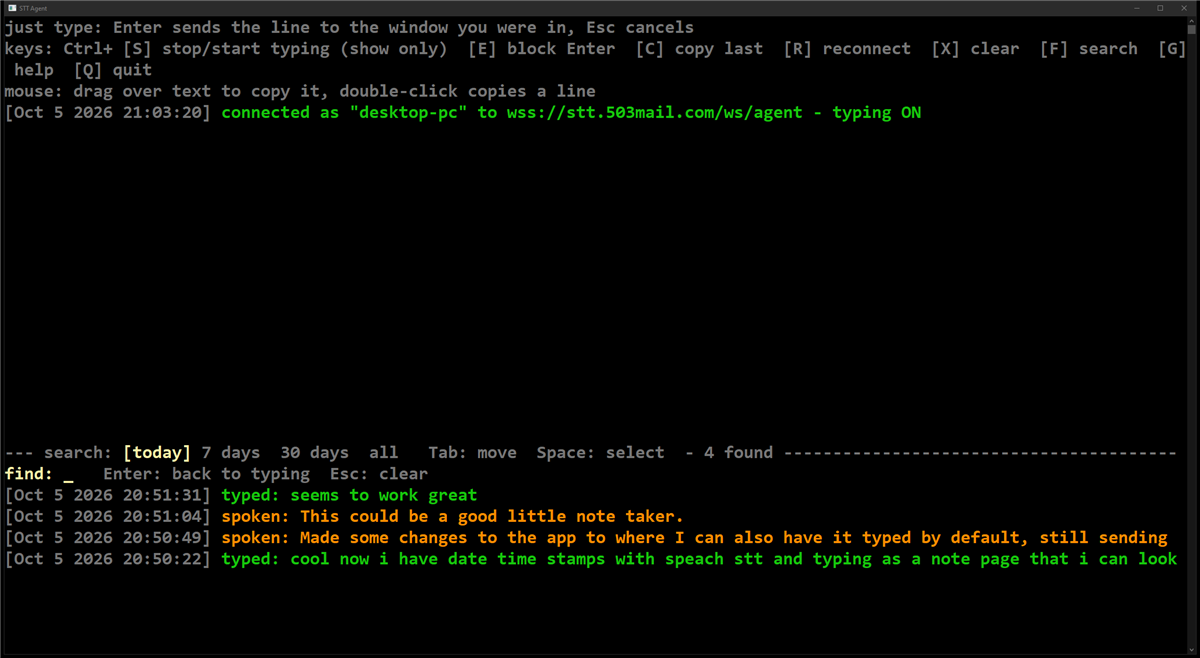
How it works:
- Ctrl+F puts the keyboard in the search box. Results update as you type, newest first, spoken in orange and typed in green. The search is case-insensitive and also matches the date, so "Oct 5" works.
- Tab moves over the ranges: today, 7 days, 30 days, all, and back to the search box. Shift+Tab or Ctrl+Shift+Tab moves backwards. The one you're on is shown in reverse colours; Space selects it, and the selected range shows in yellow
[brackets]. The header also shows how many entries were found. - Typing any letter goes back to the search box. Enter returns to normal typing and keeps the results; Esc clears the search and returns.
- The panel shows the newest matches that fit. The top part of the window no longer keeps scrollback; use the search instead.
To search the logs from PowerShell instead (on your PC; change the folder to wherever the agent lives):
findstr /i /c:"yourword" "$env:USERPROFILE\stt-agent\logs\*.txt"The agent window: transcripts show in bold orange on black, at font size 20 (the whole agent window is bold) in the Windows console. To change the size, add "font_size": 24 (or any size) to stt-agent.json.
- Copy on select (Windows console): drag the mouse over text and it's copied the moment you let go, with no Enter or right-click needed. Double-click copies a whole line.
- The agent turns off the console's own QuickEdit selection for this and handles the mouse itself, including the scroll wheel.
- In Windows Terminal, the agent leaves the mouse alone; turn on Windows Terminal's own
copyOnSelectsetting instead. - On Linux, the terminal app decides (most copy a selection for middle-click paste already).
If you dictate while the agent's own window is focused, the incoming text isn't mistaken for key commands. Keystrokes arriving while it types are ignored.
Troubleshooting: where the logs are
The relay (logins, transcriptions, computers connecting)
- Where: the systemd journal inside CT 301 (stt-server).
- Open: the Proxmox host shell (or the CT 301 Console without the
pct exec 301 --part).
pct exec 301 -- journalctl -u stt-server -n 100 --no-pagerFollow it live while you dictate:
pct exec 301 -- journalctl -u stt-server -f- Look for:
agent desktop-pc connectedmeans that computer is online. A healthy dictation logstranscribed 19.3s audio -> 139 chars (convert 0.08s, whisper 1.31s)and thensent 139 chars to desktop-pc (... delivered=True, typed=True).delivered=Falsemeans the agent didn't answer within 5 seconds.typed=Falsemeans its typing is paused (skey).agent rejected (bad token)means a wrong or revoked token.whisper:errors mean the engine below is down.- Download links log
setup link created for laptop (windows)and thensetup download 1/3 for laptop ...; the computer's token becomes active on that first download. - Pressing Tab or Enter on the phone logs
sent enter to desktop-pc. - The text itself is never logged, by design.
The speech engine (whisper.cpp)
- Where: the systemd journal inside CT 301 (stt-server).
- Open: the Proxmox host shell.
pct exec 301 -- journalctl -u whisper-server -n 100 --no-pager- Look for:
using Vulkan0 backendon start means the GPU is in use. If you instead seeno GPU foundor it falls back to CPU, check the GPU inside the container:
pct exec 301 -- vulkaninfo --summaryIt should list RADV REMBRANDT. If it doesn't, the dev0/dev1 lines are missing from /etc/pve/lxc/301.conf; compare them with /etc/pve/lxc/300.conf. A failed to open model error means the model file in /opt/stt/models/ is missing or got cut off; delete it and re-run step 4.
HTTPS, certificates, 502 errors and disconnecting agents (Caddy)
- Where: the systemd journal inside CT 108 (Caddy reverse proxy).
- Open: the Proxmox host shell.
pct exec 108 -- journalctl -u caddy -n 100 --no-pager- Look for:
certificate obtained successfullymeans HTTPS works.dial tcp ... connection refusedor a 502 means CT 301 (stt-server) or the relay is down, or CT 301's DHCP IP changed. Compare its current IP:
pct exec 301 -- hostname -Iwith the one in the Caddy config:
pct exec 108 -- grep -A6 stt.503mail.com /etc/caddy/CaddyfileIf they differ, fix the IP in /root/108_Caddyfile and redo the last two commands of step 8. Better still, give CT 301 a DHCP reservation on the router. The backups are /etc/caddy/Caddyfile.bak-* on CT 108.
The agent
- Where: its own console window for status. The text itself goes to the daily files in the
logsfolder next to the agent (see "The agent's log and search panel"); alog failedline in the window means that folder isn't writable. - Look for:
connected as "desktop-pc"is healthy.disconnected: ... retrying in 2shappens briefly whenever the server restarts. It retries with a growing delay, up to 60 s; press Ctrl+R to retry immediately.couldn't switch back to the other windowafter typing a line means Windows refused to change focus, or there was no earlier window. The line is on the clipboard.window too small for the search panelmeans the window is under about 12 rows or 30 columns.server rejected the tokenmeans you need a new token (step 9).typing failedon Linux names the missing tool (xdotool, wtype or ydotool).- On Windows, text that shows in the window but never appears in an admin window is Windows UIPI: a normal program can't type into an elevated one. Run the agent as admin if you need that.
The archive (step 16)
- Where: today's file is in
/srv/stt-archiveon the Proxmox host, and the copies are inD:\Proxmox-backups\dictation-archiveon the PC. The copy job logs to the host's journal. - Open: the Proxmox host shell.
ls -l /srv/stt-archivejournalctl -u stt-archive-sync -n 20 --no-pagersystemctl list-timers stt-archive-sync.timer- Look for:
Finished stt-archive-sync.serviceevery 5 minutes is healthy.PC share not mounted, skippingorPC share not answering, skippingmeans the PC was off or asleep; it catches up by itself.removed local ... (kept on the PC)is the 30-day cleanup. - An
archive:error in the relay's log (see "The relay" above) means the app couldn't write the file, usually because/opt/stt/archiveisn't mounted. Run step 16 again.
The install (step 4)
- Where: a file on the Proxmox host,
/root/stt/provision.log. - Open: the Proxmox host shell.
tail -n 50 /root/stt/provision.logUptime Kuma
- Where: https://status.503mail.com. There are two monitors, both tagged Personal Site:
- "stt.503mail.com — Dictate (phone dictation)" checks
https://stt.503mail.com/healthz, which answers 200 only while whisper.cpp is up. - "…:8000 — Dictate LXC (backend for stt.503mail.com)" checks the relay's port on CT 301 (stt-server).
- "stt.503mail.com — Dictate (phone dictation)" checks
- Read it as:
- Public check down, port check up: either whisper.cpp is down (see "The speech engine" above), or it's Caddy or the network.
- Both down: CT 301 (stt-server) or the relay is down.
Quick health check
curl -s https://stt.503mail.com/healthzpct exec 301 -- systemctl is-active whisper-server stt-serveragents in the healthz output is how many computers are connected right now.
Notes
- Measured: a real 19.3 s dictation took 0.08 s to convert and 1.31 s to transcribe, about 1.5 s from releasing the button to the text appearing. The bench clip (11 s) takes 1.1 s warm on the 680M and 11 s on the CPU alone.
- Why whisper.cpp and not faster-whisper: faster-whisper (CTranslate2) has no practical support for the Radeon 680M, and AMD's ROCm doesn't officially support this iGPU either. whisper.cpp's Vulkan backend just works with Mesa's RADV driver.
- Why the GPU group trick in step 4: the render node inside the container belongs to whatever group ID
pctmapped it to (gid=104). Debian 13 may not have a group with that ID, so the provision script creates one if needed and adds the app user to it, plusvideoforcard0. - Why Go for the agent: one ~6 MB file with nothing to install. It uses about 13 MB of RAM and is cross-compiled for Windows and Linux in one step. A Python agent would need Python on every PC; Windows only had the Microsoft Store placeholder.
- Whisper on silence: with nothing said, Whisper sometimes invents "Thanks for watching!" or
[BLANK_AUDIO]. app.py drops those, and clips under 0.4 s are ignored. - Two copies on one token would keep knocking each other off the server, so the agent allows only one copy per user (a named mutex on Windows, a lock socket on Linux).
- Windows console freeze: in the classic console, selecting text with the mouse pauses the program's output. The agent prints through a separate buffer, so typing and confirmations keep working while you select.
- PowerShell gotcha:
STTDictation\dist\stt-agent.exeonly works from the folder it's in, and PowerShell treats a bare relative path like a module name. Always use the full path with&in front. - Finding a good font size: zoom the agent window with Ctrl + mouse wheel. To see the size you ended up with, right-click the window's title bar → Properties → Font. Put that number in
stt-agent.jsonas"font_size", so it opens at that size every time. My desktop uses 41. - Battery (phone): the page checks the computer list every 30 seconds, and only while it's on screen; opening "Send to" checks right away. The mic is only open while recording, and the beep's audio engine sleeps between beeps. An earlier version checked every 4 seconds and kept the mic open, which ran the battery down noticeably.
- Battery (ntfy app): a different drain, if you also use the ntfy Android app for creator-chat alerts. Switch it to WebSockets (its Settings → Connection protocol); Caddy already passes WebSockets through.
- Setup links live in memory: restarting stt-server cancels any link that hasn't been downloaded yet. Make a new one.
- Vocabulary:
VOCAB_PROMPTin app.py nudges Whisper's spelling of homelab words (Proxmox, Caddy, systemctl ...). Add your own words there, then redeploy with step 6. - Change the password by re-running step 7. Add a computer with step 9 plus step 11 or 12. Redeploy app changes with step 6, and rebuild the agent with step 10.